Dialpad's desktop app and web portal are designed to be at the center of your business communications, and we're always rolling out product updates with new features, improvements, and bug fixes.
Note
To provide a seamless launch experience, Dialpad features are released gradually. You may see updates reflected in your Dialpad environment over the next few days.
Let's take a look at what's new from our most recent release on March 12, 2026.
Visit Dialpad What’s New for the latest product updates.
Be sure to update your desktop app or visit Dialpad's web portal to take advantage of our latest improvements.
New
To enhance your experience with Dialpad Meetings, we’ve added a few new features!
Group chats in meetings
You can start a separate conversation with one or more meeting participants in the same Dialpad Meetings chat, and it’s totally private!
.png)
Internal chats for external meetings
You now have a dedicated, internal chat with internal meeting participants while in Dialpad Meetings with external contacts.
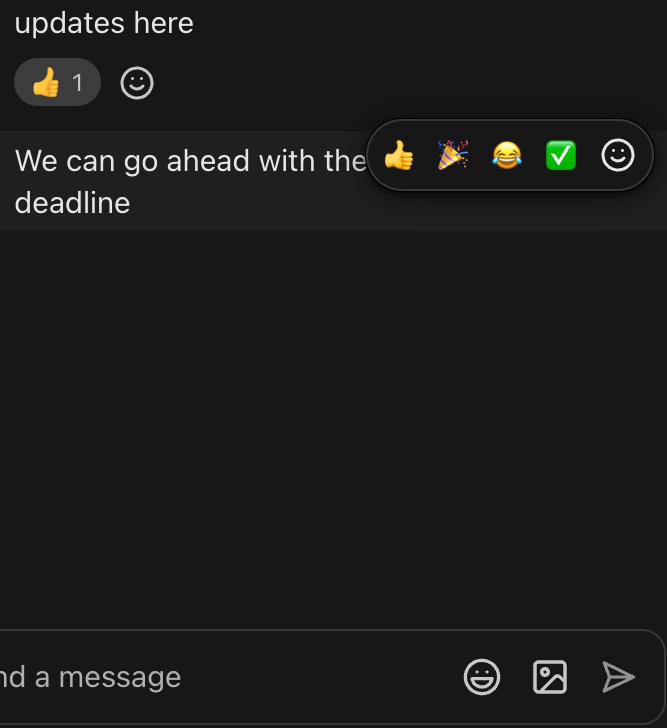
Emoji reactions in chat
You can add emoji reactions to messages in your Dialpad Meetings chat. Select from the quick emojis or the full emoji selection!
Surface control capture
You can scroll and zoom on shared Chrome tabs directly from the Dialpad Meetings window.
Improvements
Zendesk
We’ve improved the Zendesk experience by adding the ability to add labels when logging calls, supporting transcription and call details during logging, and using CRM contact information in the subject or notes.
Analytics
We’ve improved the experience when filtering SLA % information in the Queue Health Report.
Critical bug fixes
E911
Some users reported that when validating an address for E911 while creating an office outside the US, they received a 501 error. This has been fixed!
Messaging
A few users reported that when typing a message in the message field, the typing focus would switch to the emoji icon. It was also reported that bulk messaging didn’t work as expected. We've fixed these.
Devices
There were reports of line keys not setting properly, MAC addresses not validating while provisioning Grandstream ATA devices, and custom backgrounds not displaying properly. These have all been fixed.
Billing
Some users reported that the unified billing invoice creation process gets stuck on a plan. This has been fixed.
Calling
A few users reported that call recording links were missing. We’ve fixed this!
Coaching Hub
There were reports that coaches couldn’t search for contacts who had calls with trainees, deleting an AI Live Coach Card wouldn’t work as expected, and AI CSAT scores wouldn’t display when filtered a certain way. These have been fixed!
Other improvements
We've also fixed some minor bugs and behind-the-scenes functionality, improving your overall experience with Dialpad.
Happy Dialing!