Dialpad’s PII Redaction feature helps reduce the risk of exposing sensitive information (like payment card numbers and social security numbers) in call transcripts and audio recordings. It is currently available through an Early Adopter Program (EAP) for eligible customers.
When enabled, Dialpad automatically detects and redacts selected categories of personally identifiable information (PII) from:
Real-time voice transcripts for calls (and certain meetings)
Post-call audio recordings for calls, when audio redaction is turned on
Redacted content is permanently removed and cannot be restored.
EAP feature
PII redaction is currently in an Early Adopter Program and is not yet available to all users.
If you'd like to enroll in this program, submit your application here.What’s supported:
Call, voicemail, and meeting transcripts are supported.
Call recordings are supported when audio redaction is enabled.
Meeting recordings are not yet redacted; only their transcripts are covered.
What’s new (2025–2026 updates)
For customers enrolled in the EAP:
Real-time call and meeting transcription: PII is redacted in the final transcript for supported PII categories.
AI Moments, AI Recaps, AI Playbooks, AI Scorecards: If your company is in the EAP, these AI features consume PII-redacted transcripts, ensuring sensitive information is not surfaced in analytics and summaries.
Call recordings (audio): When audio PII redaction is enabled, Dialpad uses a short post-call analysis to locate PII in the recording and mute or remove those segments.
What is personally identifiable information?
Personally Identifiable Information (PII) is information that is directly or indirectly related to a specific person.
Currently, Dialpad AI redacts numeric PII data only.
Credit card numbers and personal identification numbers (such as your Social Security or Social Insurance number) will be redacted, along with unrecognized numbers more than 3 digits long (think CVC codes).
Don't worry, not all numeric data will be redacted! Dialpad automatically recognizes and preserves phone numbers, account/order numbers, as well as date, time, and currency notations.
PII redaction in Dialpad
When enabled, Dialpad automatically detects and redacts selected categories of personally identifiable information (PII) from:
Call, voicemail, and meeting transcripts: PII is redacted in the final transcript for supported PII categories.
AI Moments, AI Recaps, AI Playbooks, AI Scorecards: If your company is in the EAP, these AI features consume PII-redacted transcripts so that sensitive information is not surfaced in analytics and summaries.
Call recordings (audio): When audio PII redaction is enabled, Dialpad uses a short post-call analysis to locate PII in the recording and mute or remove those segments.
Note
Meeting recordings are not yet redacted; only their transcripts are covered.
Turn on PII redaction
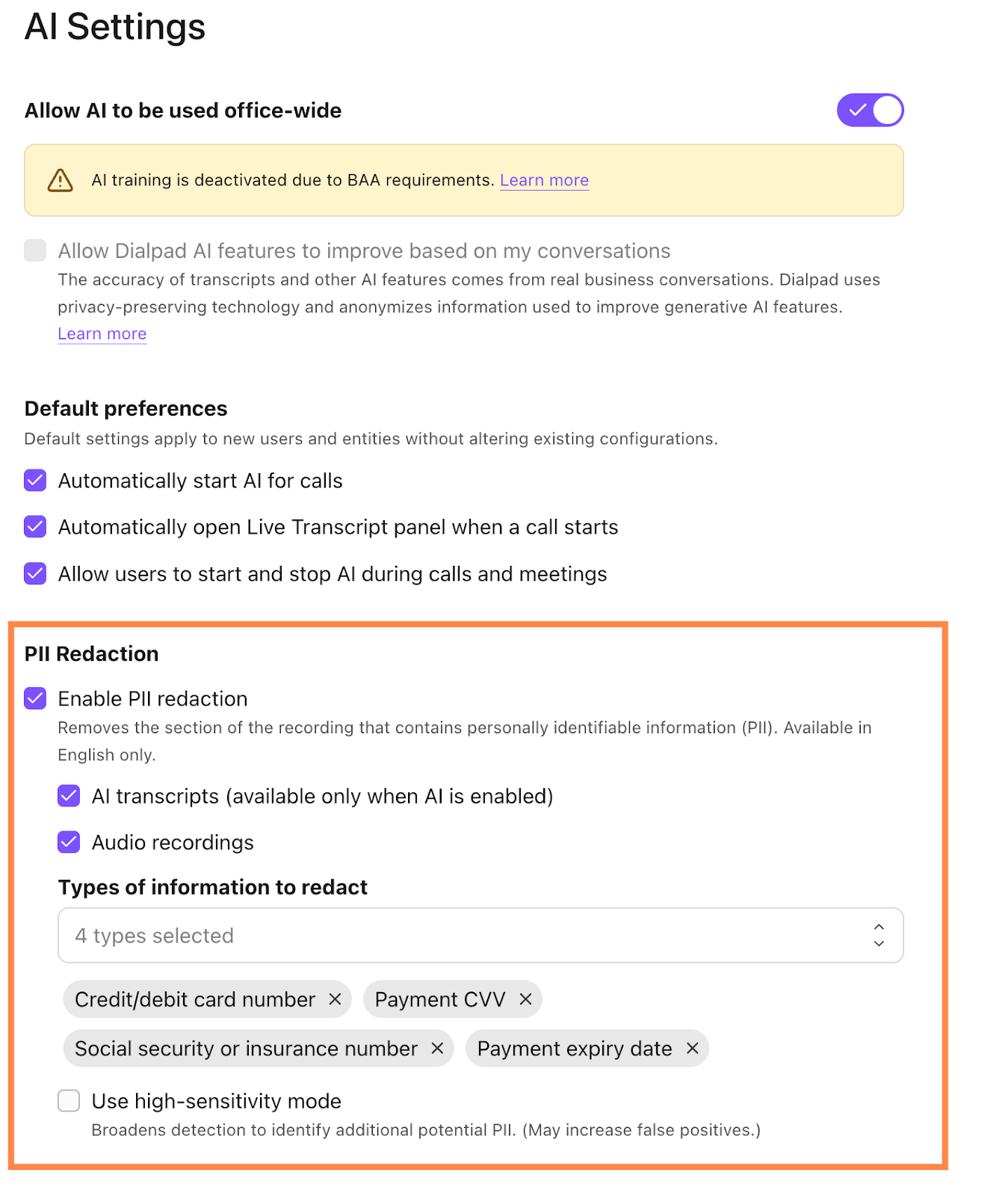
PII redaction is configurable at the office and group level in the Dialpad Admin portal. Dialpad AI must be enabled, and you must be an Office or Company Admin to turn on PII redaction.
To turn on PII redaction, go to your Dialpad Admin Settings.
Select Office > AI Settings
Select Enable PII redaction
Choose whether to apply it to:
AI transcripts only
Audio recordings only
Both transcripts and recordings
Select which PII categories are redacted by default
Optional: Enable high-sensitivity mode, which broadens coverage (higher recall) at the cost of more aggressive redaction (lower precision).
Notes
PII redaction is managed at the office and group level.
Dialpad AI must be available/enabled for transcript redaction, but audio redaction can run even if live transcription and other AI features are disabled.
Once enabled, live call transcripts will redact the selected sensitive data and replace it with asterisks in real time.
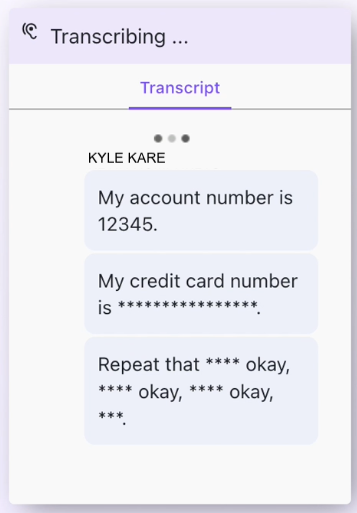
Once the call ends, your call summaries will display redacted data as asterisks.
.png)
How audio redaction works
When audio PII redaction is enabled, after the call ends, Dialpad performs a brief automatic post-call analysis of the audio recording.
The system then transcribes the audio, uses the transcript to identify PII timestamps, and then redacts those audio segments in the recording. The temporary transcript used for this analysis is immediately deleted and is not stored or made available to Dialpad users.
Accuracy and limitations
Our latest internal evaluations show that, with high-sensitivity mode enabled, PII redaction achieves around 95% coverage for key payment-related identifiers.
Because the system relies on predictive AI models, it:
Cannot guarantee 100% accuracy
May occasionally miss PII (false negatives)
May sometimes over-redact non-PII content, such as account numbers, part numbers, tracking IDs, or other business-critical numeric strings
Important
Because of these limitations, customers are responsible for reviewing PII redaction results and confirming that they meet their compliance and risk requirements.
Once redacted, PII cannot be recovered from Dialpad or exported data; there is no way to “undo” redaction on an existing transcript or recording.
Data handling and privacy
Dialpad’s PII redaction models are built and operated in-house; data is not sent to external LLMs for PII detection. WWhen PII redaction is enabled, all downstream Ai features and integrations that rely on transcripts and/or recordings receive the redacted versions. For model training, Dialpad uses separate anonymization pipelines that scramble or mask PII in datasets before they are used to train or evaluate AI models.
Cost
During the EAP, transcript redaction using the default categories is included at no additional charge.
After the release, there will be an additional charge for audio PII redaction and customizing the set of PII categories beyond the defaults.
Your Customer Success Manager will provide up-to-date pricing as we approach the feature release.
Frequently asked questions
Can I use PII redaction in any language?
Not currently, but we're working on it! For now, PII redaction is available only in English, but stay tuned as we add more languages.
Does PII redaction work in audio recordings?
Yes. We support audio redaction. Reach out to your Customer Success Manager if you’d like to get enrolled.
Note
Dialpad creates a short, temporary transcript after each call to find and redact PII. This happens even when AI features are turned off, and the transcript is deleted immediately.
Can I choose what is redacted?
Yes. Admins can configure which PII categories are redacted and whether redaction applies to transcripts, recordings, or both. You can also enable a more aggressive high-sensitivity option if you prioritize coverage over precision.
What about non-numeric personal information?
Dialpad offers PII redaction for numeric details only. We are still developing this feature and will soon add additional functionality.
Does PII redaction work for in-app messaging or external SMS messages?
Not yet. Redaction currently applies only to live and post-call transcripts.
However, messages sent via a Dialpad Digital Engagement channel will be redacted.
Does PII redaction work for meetings?
Meeting transcripts are redacted when PII redaction is enabled.
Meeting recordings themselves are not yet redacted; only the transcript is covered.
Can I un-redact information once it has been redacted?
No. Once PII is redacted from transcripts and recordings, it is permanently and irreversibly removed from Dialpad systems and cannot be restored.
How accurate is PII redaction?
PII redaction achieves around 95% coverage for sensitive payment identifiers in our tests, especially when high-sensitivity mode is enabled. Because it relies on predictive AI, it is not guaranteed to be perfect, so you should review results to make sure they meet your requirements.
Does this make us PCI compliant?
PII redaction is designed to significantly reduce exposure of cardholder data, and with high-sensitivity mode enabled we see about 95% coverage in internal tests. However, because no AI-based solution is 100% accurate, Dialpad cannot guarantee compliance on its own; you should validate that the feature meets your organization’s PCI and other regulatory requirements.
I have feedback, who can I talk to?
We want to hear your thoughts! Please send PI redaction feedback via this brief survey or reach out to pii-feedback@dialpad.com with feedback or questions at any time.