Cold calling is hard enough on your sales team. One simple way you can help their outreach efforts is to give them phone numbers with area codes that recipients recognize. This increases the odds that prospects will take the call.
With Dialpad’s Local Presence dialing, sales teams can leverage a bundle of area codes that match up with their territories throughout the US automatically—without any extra work for your call center team.
Let's take a look at Local Presence in Dialpad.
Who can use this
Local Presence is included in the Dialpad Sell Advanced and Premium plans and is available as a paid add-on for other plans.
This feature is only supported for the US numbers and requires Local Presence numbers.
How Local Presence works
Dialpad's Local Presence packages give sales managers and teams three options for purchasing Local Presence numbers. Once you've purchased your Local Presence bundle, you can assign the feature to any of the contact centers associated with your Dialpad account (meaning more than one Contact Center within an office can leverage this feature!)
Sales reps then choose the Local Presence option when placing an outbound call from their Dialpad app to automatically detect and match the recipient’s number.
When a call is returned, rather than routing to the available rep, Dialpad automatically routes it to the rep who originally placed the call. If that rep can’t answer, the call will be routed to the next available rep in the group (or follow the call routing options the manager has set).
Purchase Local Presence
To purchase a Local Presence package, go to your Dialpad Admin Settings.
Navigate to Office
Select Office Settings
Navigate to Local Presence
Dialpad offers three Local Presence options:
Top 100 Metro Areas: Covers around 80% of the U.S. population
Individual Phone Numbers: A single phone number that is important to your business
Complete Package: Covers around 95% of the U.S. population
Choose a purchase option, then follow the prompts to add Local Presence to your Dialpad account.
Note
If you aren’t on a Dialpad Sell Advanced or Premium plan, you need to purchase a Local Presence add-on license.
Once you've purchased a bundle, you’ll see the coverage area.
Tip
Read our Local Presence Area Codes article to learn more about the most popular Local Presence area codes and packages.
Exact numbers vary depending on your region and availability. Select View Coverage Areas to see a list of area codes and cities.
Enable Local Presence for a Contact Center
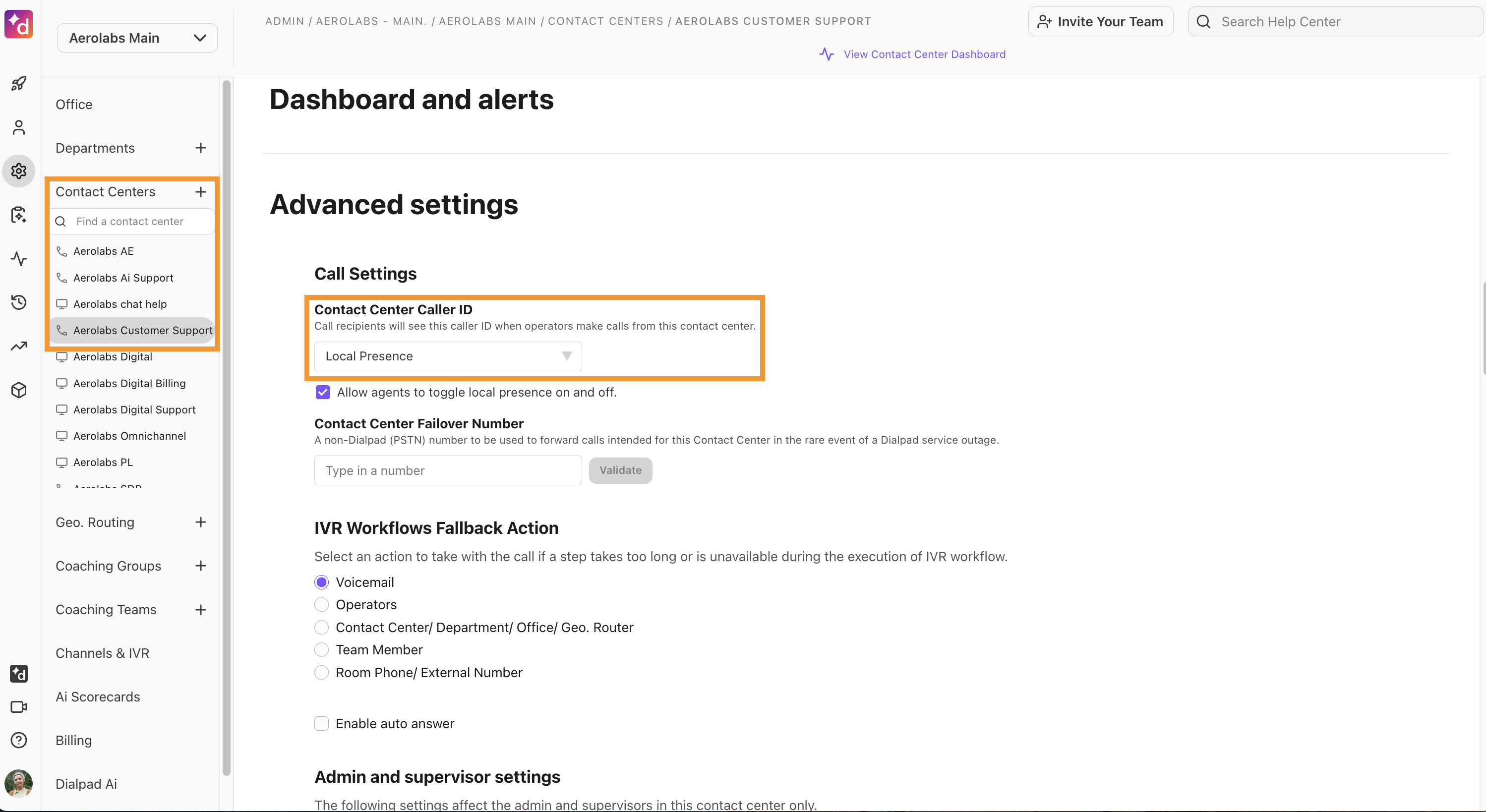
To enable Local Presence for a Contact Center, go to your Dialpad Admin Settings.
Navigate to Contact Centers
Select the desired Contact Center
Select Advanced Settings
Navigate to Contact Center Caller ID
Select Local Presence
Note
The Contact Center must have at least one number assigned for Local Presence to show as a Caller ID option.
If you aren’t on a Dialpad Sell Advanced or Premium, you need to purchase a Local Presence add-on license.
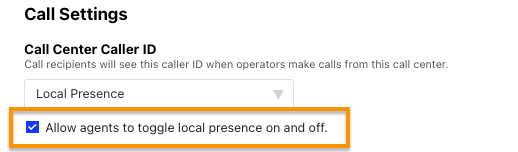
To allow agents to choose between the Contact Center line and Local Presence for outbound calls, select the Allow agents to toggle Local Presence on and off checkbox.
Use Local Presence as a Contact Center agent
If you're on a Dialpad Sell license and your Admins have configured Local Presence as your Contact Center's default number, you won't have to do anything — your caller ID will automatically be set to a Local Presence number.
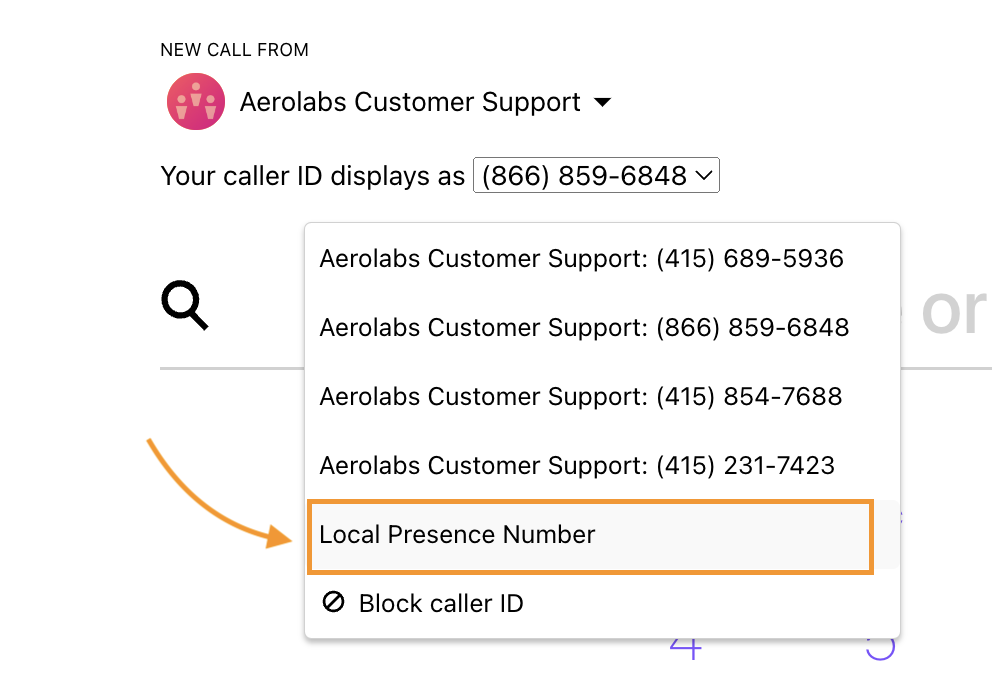
If your Admins have set a non-Local Presence number as the default, and have granted Agents permission to turn Local Presence on or off, you can change to a Local Presence number before placing your call.
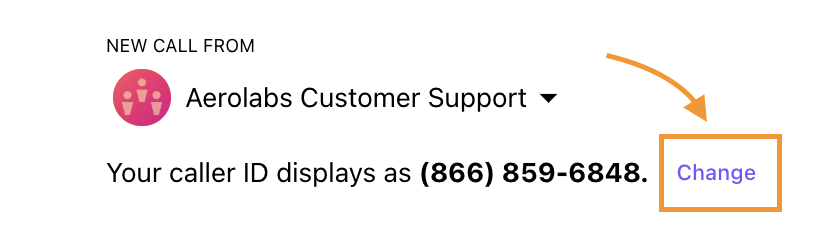
From the Dialer:
Navigate to NEW CALL FROM
Select Change
Select Local Presence Number
During the call, you'll see a label indicating Local Presence is active.
Note
If the call recipient's area code matches the Contact Center's area code, Local Presence may not be used.
Use Local Presence in Coaching Teams
Your Coaching Teams can also use Local Presence!
To apply Local Presence to Coaching Teams, go to your Dialpad Admin Settings.
Navigate to Coaching Teams
Select the desired Coaching Team
Navigate to Local Presence
Check the box beside Use this office's Local Presence numbers for members of this Coaching Team
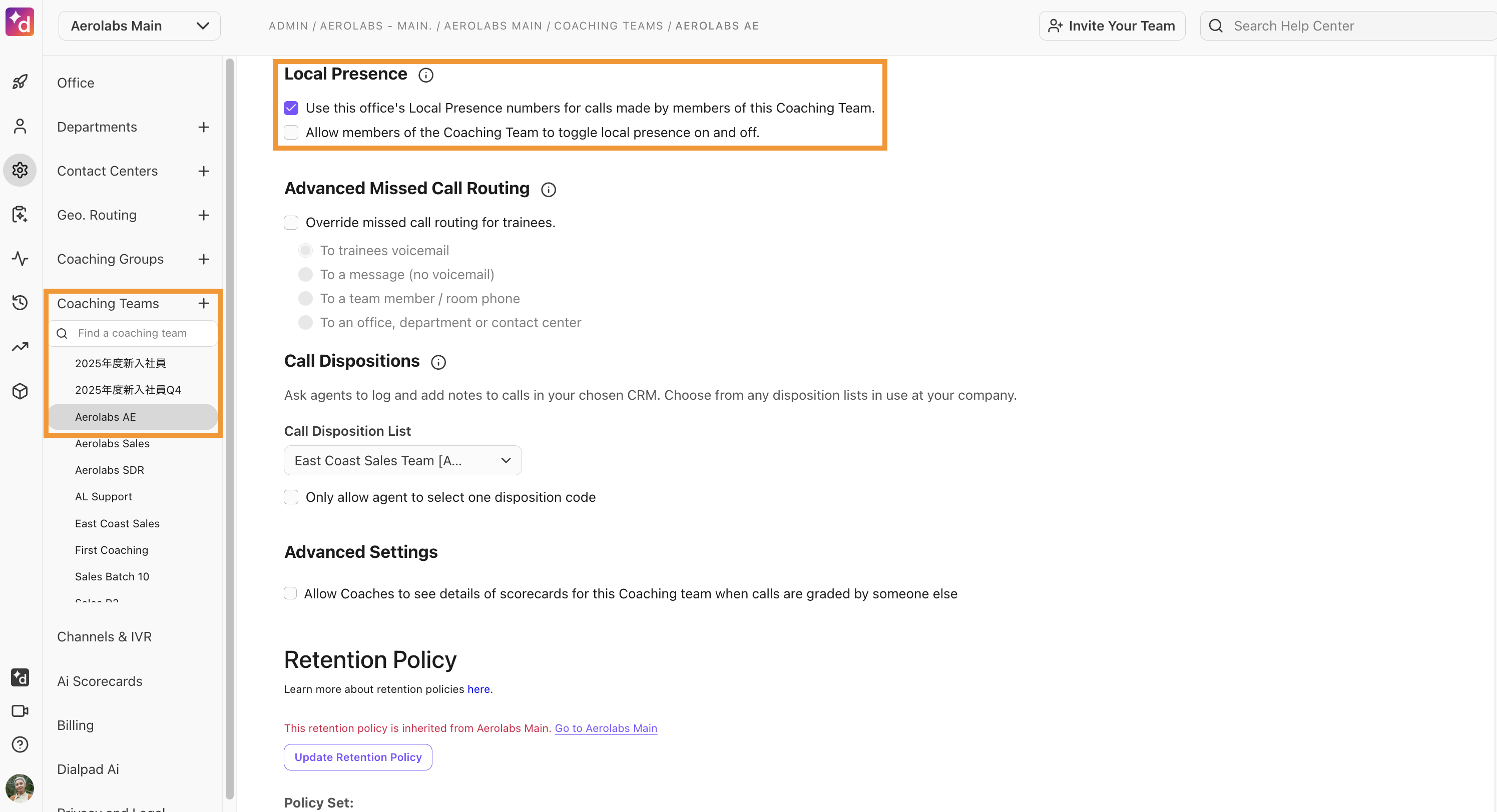
If you want trainees to be able to choose between Local Presence and their personal number, check the box beside Allow members of the Coaching Team to toggle Local Presence on and off.
Notes
Local Presence settings for Coaching Teams apply only to trainees.
A Coaching Team must have at least one coach; otherwise, trainee calls are treated as personal calls, and Local Presence does not apply.
Coaching Teams don’t have their own number. Calls originate from the trainee’s number and are replaced by a Local Presence number only when all conditions are met.
Troubleshooting
Caller ID override
A per-contact caller ID override can cause calls to use your personal number instead of a Local Presence number, even if you select Use Local Presence for your calls. To check this, open the contact and review the From setting — if it’s set to your personal number, change it to Local Presence Number.
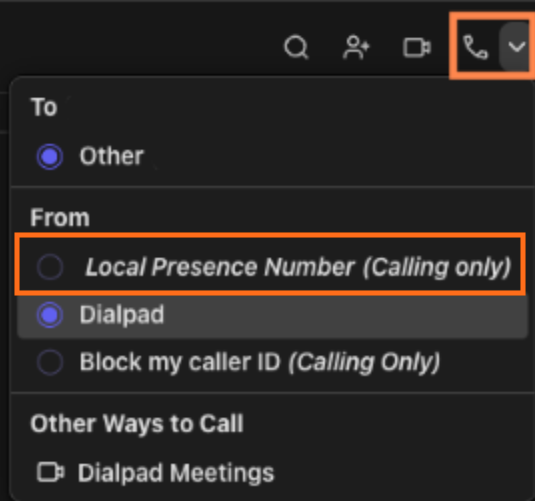
Note
Existing contacts with a Caller ID override will continue to use that setting until you remove it, but any new contacts you create while Use Local Presence is turned on will default to using a Local Presence number.
Contact Centers
If Local Presence isn’t working for Contact Center calls, verify that:
The Contact Center has at least one number assigned for Local Presence
Required Local Presence add-on is enabled.
Coaching Teams
If Local Presence isn’t working for Coaching Team calls, verify that:
The Coaching Team has an assigned coach
The call is a Coaching Team call, and not a personal one
The called area code is in (or overlapped by) the Local Presence numbers
Frequently asked questions
Why is the Local Presence feature not working for my personal calls?
Local Presence only applies to group calls (Contact Center and Coaching Team calls). Any calls from a user’s own personal line are not replaced by Local Presence and will show the user’s personal phone number.
What happens when someone calls back?
If the recipient of a call calls back to a Local Presence-based number, the call will be routed to the Contact Center using the same Local Presence number. Dialpad first attempts to reach the agent who made the outbound call, then routes it to another agent.
For Coaching Teams, if the recipient of an outbound call returns the call by dialing that Local Presence-based number, it'll be routed back to that trainee or the trainee’s voicemail if the call was missed.
If they dial a Local Presence-based number that did not originate from an agent/trainee, the call will be routed to the Office Main Line.
What happens if we play phone tag (I call someone back after they returned my call) will my Local Presence number change after the second call?
It depends on where you’re calling. The system will automatically assign a Local Presence phone number to you based on the specific region you are calling.
What happens if a rep calls a number whose area code is not part of the number bundle I’ve purchased?
If the area code being dialed is not in the Local Presence number bundle, Dialpad will try to find a nearby area code in your purchased bundle based on LATA (Local Access and Transport Area). This lookup occurs automatically when a call is placed, and if no suitable area codes are available in the bundle, Dialpad will default to the Contact Center area code.
What should I do if Local Presence reads 'unable to allocate a number for this area'?
We may occasionally run out of area code-specific numbers. If you don't see your desired area code, please contact our Customer Care Team for assistance.
What happens if a rep calls an area with overlapping area codes?
Local Presence will automatically choose the area code that is part of the bundle that you’ve purchased, meaning the outbound area code might not exactly match the area code being called. For example, when dialing a 646 area code in Manhattan, the outbound number might show as the 212 overlapping area code included in the coverage area of your Local Presence package.
What does 'Dynamic Caller' mean in call logs?
An inbound call to a Local Presence phone number will be labeled as 'DynamicCaller' in the call logs. There is no charge for outbound calls that appear as normal outbound calls from the Contact Center.
What happens if someone texts a Local Presence number?
We do not offer SMS service for Local Presence numbers.
Will Local Presence work if an agent is assigned to a Contact Center that uses Salesforce Powerdialer?
Yes. Local Presence must be enabled in the Contact Center from the Dialpad Admin Portal.
Agents should verify that the caller ID they are using is set to Local Presence before dialing out using the Salesforce Powerdialer.
What if I don't want to use Local Presence?
If your Admin has enabled the option to allow agents to toggle Local Presence on or off, you can manually change your caller ID number off of Local Presence by selecting Change and choosing a different number.
What should I do if a local presence number is appearing as SPAM?
To avoid spam labeling, all local presence numbers must be registered. Follow the steps in this Help Center article.