Need to manage large volumes of incoming calls to your department? Dialpad's Department Call Park feature allows Agents to handle calls as a team by moving incoming calls to a "parking lot" where teammates can pick them up from another extension.
Let's take a look at how parking a call works.
Who can use this
Department Call Parking is available for all users. A Department can park up to 50 calls at a time on the Line, and only operators within the same department can view these parked calls.
Park a call on a Department line
To park a call on a department line:
In the call, select Park

Select which department line you wish to park the call in

Dialpad parks the call in the Department inbox's Parked section, ready for another team member to take over.
Tip
The maximum hold time determines how long a call can be parked on the Department line before being answered. If not answered, it will route to the Department fallback option, preventing callers from getting stuck in a loop.
Unpark a call on a Department line
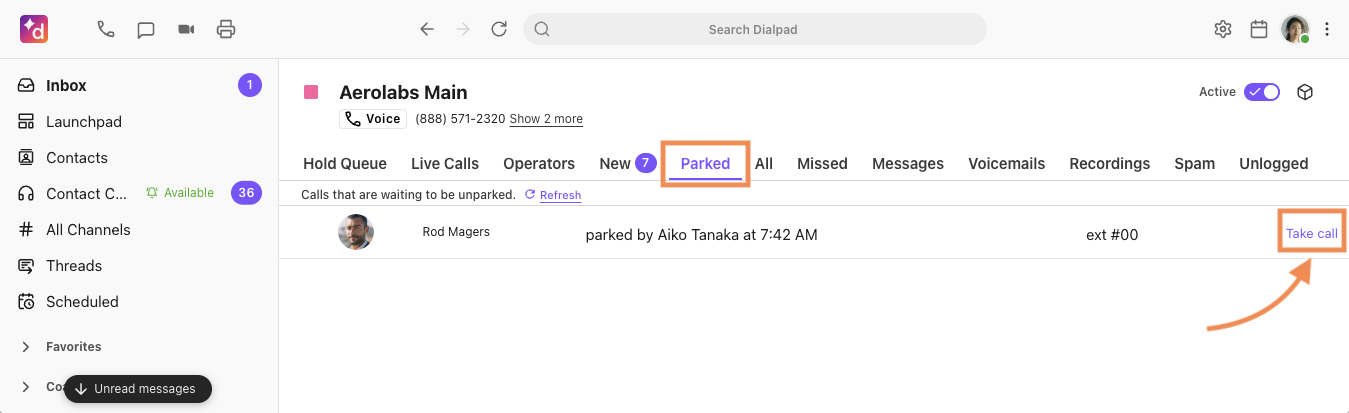
To unpark a call on a Department line from the Dialpad app, navigate to the Parked section of your Department inbox.
Here you'll see the caller's name (Caller ID), who parked the call, and when it was parked.
Select Take call to join the call and connect with the caller.
Department call parking on desk phones
To learn how to park a call for a department on a desk phone, read this Help Center article.