Dialpad offers monthly updates to the Dialpad for Salesforce package, ensuring you get the most out of our integration.
This article covers upcoming updates to the Salesforce for Salesforce Package only. Be sure to review our Dialpad Release Notes for more information on product updates.
Don’t forget to update your Salesforce package to take advantage of the latest improvements
We always recommend updating your Salesforce package in the Salesforce Sandbox first. If you encounter any issues during the update process, please contact your Customer Success Manager or Dialpad Support.
Note
Dialpad is committed to providing you with the best possible package. Our features undergo rigorous quality assurance (QA) testing, and we are picky! While we do our best to release the features on the dates listed in this article, if our QA team finds something that's not working exactly as we want, we will delay the feature and push it to the following release.
August 2, 2026
Salesforce package updates v1.835
To use features in the package, you must update your Salesforce package.
Improvement
Timezone picklist
The Salesforce timezone field now uses a normalized picklist instead of free text. Existing values are migrated automatically, and the previous field is now labeled Timezone (Deprecated).
Process child records with parent objects
When creating Powerdialer lists, you can now choose to process child records when using parent objects for cross-object filtering. This setting is off by default.
Bug fixes
Duplicate boundary lines bug
Some users reported that the Dialpad AI component on the Salesforce Task page showed duplicate field borders after a call was logged. We’ve fixed this.
Missing close icon bug
A few users reported that the Powerdialer close button did not display its “x” icon. This has been fixed!
Missing Created Date column bug
Some users reported that Created Date did not appear on the List Prioritization page, even when it was selected in Manage Table Columns. We’ve fixed this.
Unresponsive Call Center Prioritization bug
A few users reported that the Call Center Prioritization page could become unresponsive during certain actions. This has been fixed!
Field mapping save issue bug
Some users reported that Status and Subject could disappear from the Task field mapping, and mapping changes could fail to save. We’ve fixed this.
Excessive query rows bug
A few users reported that high-volume orgs could encounter a Salesforce "Too many query rows: 50001” error during task creation. This has been fixed!
July 21, 2026
Dialpad for Salesforce updates
This release includes updates to Dialpad for Salesforce and does not require a package update — just open the Dialpad app to see the new features and functionality.
Bug fixes
Company reconnect crash
Some users reported that reconnecting Salesforce at the Company level could fail with an error. We’ve fixed this.
SMS logging exception page bug
A few users reported that the Salesforce User Exception page could incorrectly show Salesforce User and Queue options when SMS logging was enabled. This has been fixed!
Performance degradation
Some users reported that background loading in Salesforce could increase page load time and surface console errors. We’ve fixed this.
Duplicate wrap-up timers bug
A few users reported that multiple wrap-up timers could appear after Contact Center calls, or display incorrectly for peer-to-peer calls. This has been fixed!
CTI exception page redirect bug
Some users reported that Connect to Sandbox or Connect to Salesforce from the shared-line exception page could lead to a generic error page. We’ve fixed this.
July 9, 2026
Dialpad for Salesforce updates
This release includes updates to Dialpad for Salesforce and does not require a package update — just open the Dialpad app to see the new features and functionality.
Bug fixes
Task finalization issue
Some users reported that Salesforce Tasks could remain in Active call status if recording was toggled on and off multiple times during a call. We’ve fixed this.
CTI initialization crash
A few users reported that Salesforce CTI could crash if an incoming call arrived before initialization finished. This has been fixed!
Screen-pop crash
Screen pop could fail if a Salesforce lookup response was missing an expected error field. We’ve fixed this.
Confirm phone number setting bug
A few users reported that the “Confirm phone number before placing call” setting was ignored in Salesforce CTI. This has been fixed!
June 22, 2026
Dialpad for Salesforce updates
This release includes updates to Dialpad for Salesforce and does not require a package update — just open the Dialpad app to see the new features and functionality.
Improvement
Smoother Salesforce Lead Conversions
The Dialpad sidebar now automatically updates the exact second you convert a Salesforce Lead to a Contact. You get the correct info immediately, completely skipping the wait for your next call.
Bug fixes
Powerdialer CTI call bug
Some users reported a 10-second delay when starting or stopping Powerdialer calls through the CTI. This has been fixed.
CTI and call logging bug
A few users reported that their CTI screen would go completely blank and fail to log calls if a contact was linked to a Salesforce record with a long name. We’ve fixed this!
Salesforce API bug
A few users reported that Dialpad was sending thousands of unnecessary, broken data requests to Salesforce every day because they lacked specific security permissions, which was consuming their daily API limits. This has been fixed.
June 11, 2026
Dialpad for Salesforce updates
This release includes updates to Dialpad for Salesforce and does not require a package update — just open the Dialpad app to see the new features and functionality.
Bug fixes
Salesforce CTI session expired error after upgrade bug
Some users reported an issue where they were seeing ‘session expired errors in the Salesforce CTI after upgrading to Hyperforce. This has been fixed.
June 3, 2026
Dialpad for Salesforce updates
This release includes updates to Dialpad for Salesforce and does not require a package update — just open the Dialpad app to see the new features and functionality.
Bug fixes
Manual match layout bug
Some users reported that the Manual Match window looked misaligned, making certain options harder to access. We’ve fixed this.
Duplicate call ID bug
A few users reported that click-to-call in Salesforce was creating duplicate records for a single call. This has been fixed!
June 1, 2026
Dialpad for Salesforce updates
This release includes updates to Dialpad for Salesforce and does not require a package update — just open the Dialpad app to see the new features and functionality.
Bug fixes
Call log missing tasks bug
Some users reported that Dialpad call logs were not appearing in the Salesforce Activity Timeline, even though the call records were successfully created. We’ve fixed this.
Auto-creating lead in Salesforce bug
A few users reported that answered inbound calls from unknown phone numbers were no longer automatically creating Leads in Salesforce when no matching record existed. This has been fixed!
May 21, 2026
Dialpad for Salesforce updates
This release includes updates to Dialpad for Salesforce and does not require a package update — just open the Dialpad app to see the new features and functionality.
Bug fixes
Custom and standard objects bug
Some users reported that the Custom and Standard Objects panel in Salesforce settings showed a “Requires authentication” message even when they were already connected to Salesforce. We’ve fixed this.
Connect Salesforce to desktop app bug
A few users reported seeing a blank screen instead of the Salesforce login page when connecting Salesforce from the Dialpad desktop app for the first time. This has been fixed!
CTI call activity bug
Some users reported being able to save call activity in the CTI without completing the required manual contact match step. We’ve fixed this.
May 13, 2026
Dialpad for Salesforce updates
This release includes updates to Dialpad for Salesforce and does not require a package update — just open the Dialpad app to see the new features and functionality.
Improvement
Salesforce OAuth security updates
Updated the Salesforce OAuth flow to support PKCE and Refresh Token Rotation as part of Salesforce’s required AppExchange security standards. This helps ensure secure authentication and continued compatibility with Salesforce integrations.
Bug fixes
SMS activity logging bug
Some users reported that the “Log SMS messages as activities” setting in the Salesforce integration reverted to the default value after refreshing the page, causing SMS messages to be logged to the wrong target. The selected User or Queue value will now save correctly across page refreshes. We’ve fixed this.
AI CSAT scores not syncing to Salesforce call logs
Some users reported that AI CSAT scores from Dialpad Analytics were missing or displaying incorrect values in Salesforce Dialpad Call Logs. AI CSAT scores now sync correctly and consistently between Dialpad Analytics and Salesforce. These have been fixed!
May 11, 2026
Dialpad for Salesforce updates
This release includes updates to Dialpad for Salesforce and does not require a package update — just open the Dialpad app to see the new features and functionality.
Improvement
Improved match support in Salesforce CTI
Salesforce CTI now supports the “Force manual match” feature, allowing users to manually select the correct record instead of relying only on automatic matching. The setting description was also updated to reflect the expanded support.
Bug fixes
Custom object field mapping bug
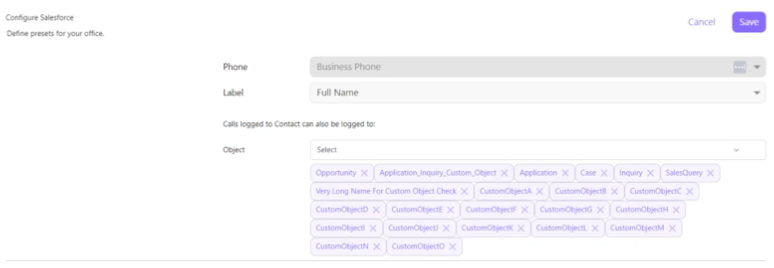
Some users reported that Custom Object field mappings appeared empty, and Salesforce settings could not be saved unless “Log calls to” was set to “Any related objects.” These have been fixed!
Wrap-up call logging bug
Some users reported that remaining wrap-up calls disappeared after logging a call in Power Dialer. The wrap-up queue now stays visible so users can continue logging remaining calls. We’ve fixed this.
Salesforce CTI call bug
Some users reported that inbound Salesforce CTI calls were no longer automatically opening the matched contact record. Auto screen pop behaviour has now been restored. These have been fixed!
Salesforce CTI Dialpad sidebar bug
Some users reported that the Dialpad sidebar was not automatically connecting after logging into Salesforce CTI, which could impact call logging. The sidebar now connects automatically during CTI login. We’ve fixed this.
April 14, 2026
Salesforce package updates v1.828
To use features in the package, you must update your Salesforce package.
New
Filter Power Dialer list by logged-in agent (record ownership)
We’ve introduced the ability for administrators to create Power Dialer lists that filter contacts by the logged-in agent's record ownership, eliminating the need to create separate lists per agent.
Improvement
‘Times Dialed’ field now locks after the Power Dialer list is activated
The ‘Times Dialed’ field in Power Dialer is now read-only once a list has been created and activated, preventing mid-session edits that could produce unexpected dialing behavior. The field becomes editable again only after the list is deactivated, and any change triggers a refresh of the list’s records.
Bug fixes
Power Dialer stops without dialing calls
A few users reported an issue where the Power Dialer failed to initiate any calls after the Start button was clicked, halting immediately without progressing through the active list. We’ve fixed this.
Calls assigned to the wrong Salesforce user
Due to a user access permissions, some call logs were being assigned to the wrong Salesforce user, resulting in a 400 error with code INSUFFICIENT_ACCESS_ON_CROSS_REFERENCE_ENTITY. The fix ensures call activity records are attributed to the correct user who handled the call.
April 10, 2026
Dialpad for Salesforce updates
This release includes updates to Dialpad for Salesforce and does not require a package update — just open the Dialpad app to see the new features and functionality.
Bug fixes
Background record selection not updating CTI "Related To" field
Some users reported that the "Select related records when opened in background" setting did not update the CTI's "Related To" field when a related record was opened in the background during or after a call. This has been fixed.
Delayed record display when connecting contacts from unlogged calls
A few users noted that when they searched for available Salesforce records in the unlogged calls section, "No records found" was initially displayed before the correct results were fetched and displayed after a delay. We’ve fixed this.
Calls not logging to the Salesforce opportunity after voicemail drop
A few calls that ended with a voicemail drop were not being logged to the associated Salesforce opportunity. This has been fixed.
Japanese IME input caused duplicate text entries in CTI description field
Some users noticed that typing in Japanese using an Input Method Editor (IME) in the CTI description field caused characters to be duplicated or tripled before the conversion was confirmed. The fix ensures Japanese IME input is handled correctly.
Incorrect call duration recorded in Salesforce call logging
Some users noticed that the Dialpad__CallDurationInSeconds__c field in Salesforce was intermittently recorded as 0.0, even though the call had a non-zero duration. We’ve fixed this.
April 3, 2026
Dialpad for Salesforce updates
This release includes updates to Dialpad for Salesforce and does not require a package update — just open the Dialpad app to see the new features and functionality.
Bug fixes
Call title not saving on first call log
A few users noticed that the call title was not saved correctly during the first log attempt in Salesforce, requiring them to manually update it afterward. The fix ensures the call title is automatically and correctly persisted upon initial logging.
March 26, 2026
Dialpad for Salesforce updates
This release includes updates to Dialpad for Salesforce and does not require a package update — just open the Dialpad app to see the new features and functionality.
Bug fixes
Intermittent Call Activity logging
Some users reported that, on every second call, the Salesforce CTI failed to load the wrap-up screen at call hang-up, resulting in call activity for matched contacts not being logged in Salesforce.
Field mapping label not displaying correctly for custom object
Occasionally, the Salesforce field mapping for custom objects displayed the internal field name (e.g., js01_intake__c) instead of a human-readable label during contact rematching. This made it difficult for agents to identify the correct field when handling customer interactions.
Company admin unable to access call logs via Salesforce links
A few Company Admins could not access the Dialpad call logs by clicking the call log links within Salesforce. The issue affected admin-recorded calls and prevented proper access to call records from the Salesforce interface.
March 11, 2026
Dialpad for Salesforce updates
This release includes updates to Dialpad for Salesforce and does not require a package update — just open the Dialpad app to see the new features and functionality.
Bug fixes
Internal calls displayed as loggable
Some outbound calls placed via the Salesforce CTI from a user to an internal office mainline were incorrectly presented as loggable calls. While the recipient correctly saw a message indicating the call was internal and would not be logged, the caller did not receive this notification and was still prompted to log the call.
Related items mismatch
A few users reported inconsistencies where the list of related objects available for call logging differed between the Dialpad "Browse All" view and the Salesforce CTI when call logging was configured to "Any Related Object." Standard and custom objects enabled under an Account were not consistently reflected across both surfaces.
Japanese IME input caused text duplication
Typing in Japanese using an IME (Input Method Editor) in the CTI description field caused characters to be duplicated or tripled, resulting in unintended extra text being inserted without user action.
March 4, 2026
Dialpad for Salesforce update
This release includes updates to Dialpad for Salesforce and does not require a package update — just open the Dialpad app to see the new features and functionality.
Bug fix
Browse all bugs
In the Dialpad sidebar within Salesforce, the "Browse All" link under the Related To field was intermittently unresponsive, and clicking it would not open the search page. The issue was account-specific and occurred inconsistently.
February 19, 2026
Dialpad for Salesforce updates
This release includes updates to Dialpad for Salesforce and does not require a package update — just open the Dialpad app to see the new features and functionality.
Bug fixes
Background Object search bug
In the Salesforce integration settings, the search dropdown under "Select the following related records when opened in background" intermittently appeared misaligned from its input field instead of rendering directly beneath it. The issue was limited to the UI and did not affect the ability to select objects.
Integration settings not saving
When an admin made changes to the Salesforce integration settings and clicked Save, the UI displayed a success confirmation but the changes were not fully persisted, causing the settings to revert to their previous state on the next visit.
Related Records displaying the API name
In the Salesforce CTI, the related records dropdown reverted to displaying the raw API field name instead of the expected record name, reproducing a formatting regression that had previously been resolved.
February 9, 2026
Dialpad for Salesforce updates
This release includes updates to Dialpad for Salesforce and does not require a package update — just open the Dialpad app to see the new features and functionality.
Bug fixes
Notes logging when empty
In the Salesforce Sidebar, when no disposition was selected, the input field displayed an error message but still allowed the call note to be logged. The expected behavior was for the note submission to be blocked entirely until a valid disposition was chosen.
Premature validation error in the ‘Related To’ field
When the "Related To" field was configured as required, the error message was being displayed before the user had attempted to log the call, rather than only appearing upon the first submission attempt. Additionally, in the Sidebar, even when the field was left empty, the note could still be submitted despite the error being visible.
Multiple tab bug
When both "Automatically launch a new CRM tab when a matching record is found for an incoming caller" and "Manual Match with Dialpad Contact" were enabled simultaneously, refreshing the Dialpad page after confirming a manual contact match would open a new Salesforce CRM tab on every subsequent refresh. The expected behavior was for the existing tab state to be retained.
Custom field bug
In the Dialpad Sidebar, the Custom Object field was intermittently displayed as mandatory even when the "Post-call mandatory Custom Object logging" feature was disabled in the Salesforce integration settings.
February 3, 2026
Dialpad for Salesforce updates
This release includes updates to Dialpad for Salesforce and does not require a package update — just open the Dialpad app to see the new features and functionality.
Bug fixes
TypeError when reading 'image_url'
A JavaScript TypeError was thrown with the message "Cannot read properties of undefined (reading 'image_url')" in the AudioCallInfoContact component when the computed imageUrl property attempted to access a property on an undefined object. This caused the component to fail during rendering when contact data was not yet available.
CTI not populating with newly created cases
A few users were unable to associate a newly created Salesforce case with the Dialpad CTI, preventing proper call-to-case linkage. The issue began after the user's Salesforce package was updated and was limited to a single affected user with no changes to Salesforce or Dialpad settings.
January 20, 2026
Dialpad for Salesforce updates
This release includes updates to Dialpad for Salesforce and does not require a package update — just open the Dialpad app to see the new features and functionality.
Bug fixes
Missing error message
When a user entered an invalid or non-existent disposition value after ending an inbound, outbound, CC, or coaching team call, the expected "No matching results" error message was not displayed. This left users without feedback that their input was unrecognized.
Unable to save changes to "Set Order of Preference"
On the Salesforce integrations settings page, changes made to the "Set Order of Preference" field (e.g., changing the order to Case | Opportunity | Account) were not being persisted after saving. The setting consistently reverted to the default value of Lead | Contact | Account upon revisiting the page.
Overflowing text
When multiple related records were selected under the "Select the following related records when opened in background" setting on the Salesforce integration page, the selected items overflowed the text box.
January 16, 2026
Dialpad for Salesforce updates
This release includes updates to Dialpad for Salesforce and does not require a package update — just open the Dialpad app to see the new features and functionality.
Bug fixes
Opportunity Search bug
When call logging was configured to "Any Related Object" and a user clicked "Browse All" then selected Opportunity to search for an existing record, the system consistently returned "No results found" even though the opportunity existed. Repeating the search multiple times would eventually return results, but the first and second attempts always failed.
Calls not opening from the Wrap-Up List
When multiple calls were in the wrap-up state simultaneously, selecting a specific call from the wrap-up list failed to open its corresponding call logging page in Salesforce CTI. As a result, agents were unable to log the selected call from the wrap-up view.
December 19, 2025
Dialpad for Salesforce update
This release includes updates to Dialpad for Salesforce and does not require a package update — just open the Dialpad app to see the new features and functionality.
Improvement
Add Call Source Field to Salesforce Call Log Object
A new "Source" picklist field has been added to the Dialpad__Call_Log__c object in Salesforce to identify how a call was initiated. The field maps Dialpad device types (such as iframe_salesforce, web, iPhone) to human-readable labels and specifically distinguishes calls initiated via the Dialpad Powerdialer from those placed through the Salesforce Powerdialer. The picklist values can be modified to accommodate evolving device-type requirements.
Bug fixes
Type error bug
A JavaScript TypeError was thrown with the message "Cannot read properties of undefined (reading 'target_key')" in the Salesforce integration's feed page (/app/feed). The error originated in the targetKey proxy accessor when attempting to read a property on an undefined object.
Call logging fields accepting a whitespace
When the Subject and Notes fields were configured as mandatory under "Make call logging mandatory," users were still able to log a call by entering only whitespace characters without providing any real content.
Case Field not populating
When both the "Set Case screenpop for incoming calls" and "Select related records when opened in background" settings were active simultaneously, creating a new case from the CTI caused the case record to open only in the background tab without automatically populating the Case field. This issue was specific to the Case object and did not affect other standard or custom objects.
Browse All Opportunity Records returning no results
Using the "Browse All Opportunity records" option in the Salesforce CTI returned no results even when matching Opportunity records existed in the org. The issue was reported by an admin and confirmed with specific call samples in the affected environment. This fix resolves the underlying lookup failure so that Opportunity records are correctly retrieved and displayed.
December 9, 2025
Dialpad for Salesforce updates
This release includes updates to Dialpad for Salesforce and does not require a package update — just open the Dialpad app to see the new features and functionality.
Improvements
Prevent PowerDialer from running when the agent is in "In a Meeting" status
This improvement ensures PowerDialer sessions do not run or place calls when the agent's status is set to "In a Meeting."
Bug fixes
Wrap-Up bug
When multiple calls were left in wrap-up without being logged, selecting a specific call from the "View All Wrap-Up" window failed to open the corresponding call log page in the Salesforce CTI. The agent was unable to complete call logging from this view.
CRM Record bug
When the CRM record order of preference was set with Case or Opportunity first, the inbound call screen incorrectly displayed the Account name instead of the matched Case or Opportunity name. The display would only correct itself mid-call after the agent answered.
PowerDialer wrap-up timer bug
After hanging up a PowerDialer call from a list assigned to both an agent and a Call Center, the wrap-up timer failed to appear, and the next call would not auto-dial until the previous call was manually logged.
CTI homescreen bug
After logging a Contact Center call from the Dialpad app, the Salesforce CTI remained on the call logging screen instead of automatically returning to the home page.
500 Errors on powerdialer-sync
The powerdialer-sync task queue was generating 500 errors caused by an unhandled AttributeError where a NoneType object was accessed for a date_started attribute when ending a PowerDialer session.
Background Object settings bug
On the Contact Center integration settings page, users could select and save background objects even after switching to "Use Office Settings," which effectively disables the "Select the following related records when opened in background" feature.
Record name length bug
When a Salesforce contact with a particularly long name placed or received a call, the CTI UI layout broke and the background color badge for the record type did not resize properly to fit the text.
Matched record footer bug
On the Salesforce CTI record matching page, when a call matched multiple records, the action icons at the bottom of the possible matches list were not visible or accessible due to a scrolling/layout issue.
Multiple wrap-up timers
After ending a Contact Center outbound call in the Salesforce CTI, two separate wrap-up timer countdowns were displayed on the post-call screen — one correct CC wrap-up timer banner and one incorrect timer shown inside the "Log" button that should only appear for PowerDialer calls.
Missing background color bug
On the Salesforce CTI transfer call page, the Frequent Contacts section was missing its white background and appeared transparent, making the UI look broken when the user scrolled to the bottom of the recent contacts list.
November 26, 2025
Salesforce package updates v1.820
Track follow-ups more efficiently
A new Callback Requested status is now available in Call Status. It helps teams see when a caller wants a follow-up, making it easier to manage and prioritize callbacks.
Salesforce Tasks save changes
Your changes to Salesforce Tasks made during a call will now be preserved. Dialpad will only apply default values when no updates are made, ensuring your custom edits stay intact.
Dialpad for Salesforce updates
Updates to Dialpad for Salesforce do not require a package update — just open the Dialpad app to see the new features and functionality.
Select SOSL or SOQL for searches in Dialpad
Salesforce uses two types of search query languages: SOSL and SOQL. SOSL is faster and ideal for large datasets, while SOQL supports formula fields but runs slower. You can now select the one that works best for your organization in Dialpad settings.
October 16, 2025
Dialpad for Salesforce updates
Updates to Dialpad for Salesforce do not require a package update — just open the Dialpad app to see the new features and functionality.
Prevent duplicate leads for shared line calls
Previously, fanout calls (when one call rang multiple agents) created a lead for each agent if “Automatically create a lead in Salesforce” was enabled. This issue has been fixed, and leads are now only created when needed to prevent duplicates in Salesforce.
September 16, 2025
Salesforce package updates v1.815
To use features in the package, you must update your Salesforce package.
Custom call status field
We’ve made it easier to check call outcomes. Instead of relying on the Subject field, there’s now a Call Status field that tells you if the call was Connected, Missed, or Cancelled.
Duplicate SMS activity log bug
Some users noticed duplicate SMS activity logs whenever both WhatID and WhoID were set. This is now fixed!
Duplicate call activity task record bug
A few users reported that extra Salesforce task records appeared for call activity whenever the created and modified fields differed. We’ve fixed this.
August 5, 2025
Salesforce package updates v1.813
To use features in the package, you must update your Salesforce package.
Migration from Workflow rules and Process builder
Salesforce will retire Workflow Rules and Process Builder on December 31, 2025.
To ensure your automation continues to function smoothly, Dialpad has migrated all legacy Workflow Rules to Salesforce Flows. This update is included in Dialpad Manage package version 1.813 and later.
Due to Salesforce’s managed package restrictions, we’re unable to deactivate or delete the retired Workflow Rules on your behalf.
You need to manually deactivate and delete the legacy Dialpad Workflow Rules in your Salesforce instance to complete the migration and prevent any future conflicts.
Screen pop custom objects in Salesforce
Custom objects now show up with screen pop in both Dialpad and Salesforce. Whether you’re using the CTI or the Dialpad app, incoming calls now trigger the related Salesforce record tied to the caller, so you’re never starting from scratch.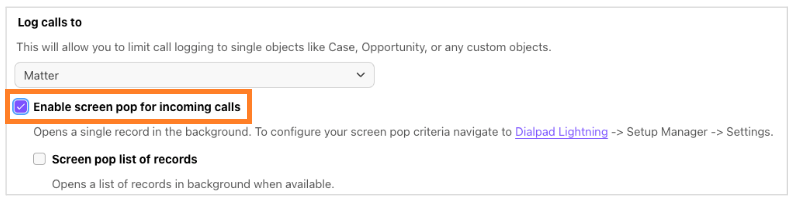
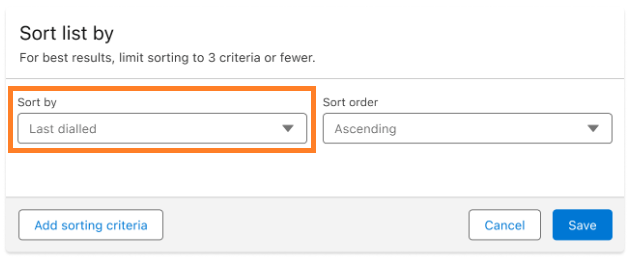
Sort your list by last dialed in Powerdialer
Admins can now have Powerdialer lists sort by ‘Last dialed’ by default, and easily change it with a custom property if needed.
Dialpad for Salesforce updates
Updates to Dialpad for Salesforce do not require a package update — just open the Dialpad app to see the new features and functionality.
Faster call logging for voicemail
Logging calls with voicemail used to take up to 10 minutes, but with recent performance improvements, it now completes in just a few minutes.
Improved record matching
Dialpad for Salesforce now uses a faster search method (SOSL) and exact matching to connect phone numbers to Salesforce records more accurately. This boosts automatic matching and improves call logging.
Salesforce information in Dialpad APIs
Dialpad API users can now retrieve Salesforce record data, including the primary record and any related records added by agents, alongside call event details such as calling, connected, and hang up.
June 17, 2025
Dialpad for Salesforce updates
Updates to Dialpad for Salesforce do not require a package update — just open the Dialpad app to see the new features and functionality.
Change to shared line SMS logging
The default assignee option for shared line SMS logging has been removed. Previously, messages could be incorrectly assigned to any connected Salesforce agent. You must now specify a Salesforce User or Queue as an alternate assignee.
Dialpad SMS Log object for 1:1 messages
The Dialpad SMS Log is now available for 1:1 messages, not just Shared Line Messages.
Log missed calls in Salesforce
This release introduces automatic logging of missed calls (and voicemails) in Salesforce for both 1:1 and shared line numbers. Admins can control this functionality via a new setting. When enabling logging for shared lines, a default assignee, such as a Salesforce supervisor or a queue, is required.
June 3, 2025
Salesforce package updates v1.805
To use features in package, you must update your Salesforce package.
Automatically log a related object
Dialpad now automatically associates call logs with related Salesforce records when only one match (e.g., opportunity, account, or contact) is found. This eliminates the need for manual linking and streamlines activity logging within your CRM.

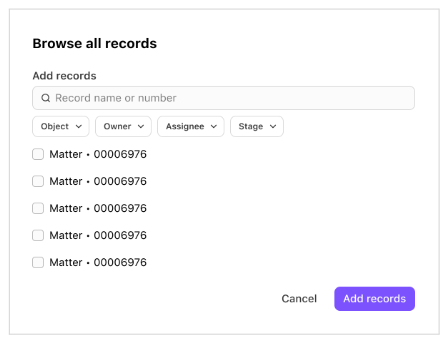
Browse records from the Dialpad sidebar
Filter and sort options, previously available in the Dialpad widget for Salesforce, are now also in the Dialpad sidebar, making it easier to manage and view your call activity.
Extract notes and call summary URLs
Extract agent-added notes and Call Summary links to improve visibility, streamline follow-ups, and keep everyone on the same page.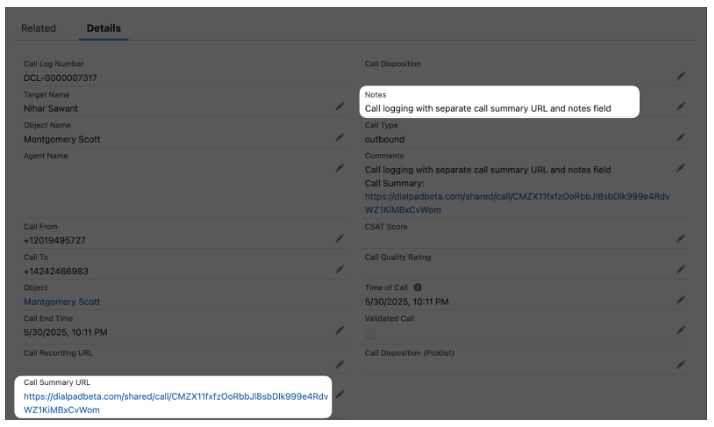
Record creation bug
A few users reported that duplicate records were created when converting a lead to a contact or account during an active call. This is now fixed!
May 6, 2025
Salesforce package updates v1.798
To use features in package, you must update your Salesforce package.
Salesforce installation bug
Some users reported that installation was blocked when encrypted fields were enabled. This has been fixed.
March 18, 2025
Salesforce package updates v1.793
To use features in package, you must update your Salesforce package.
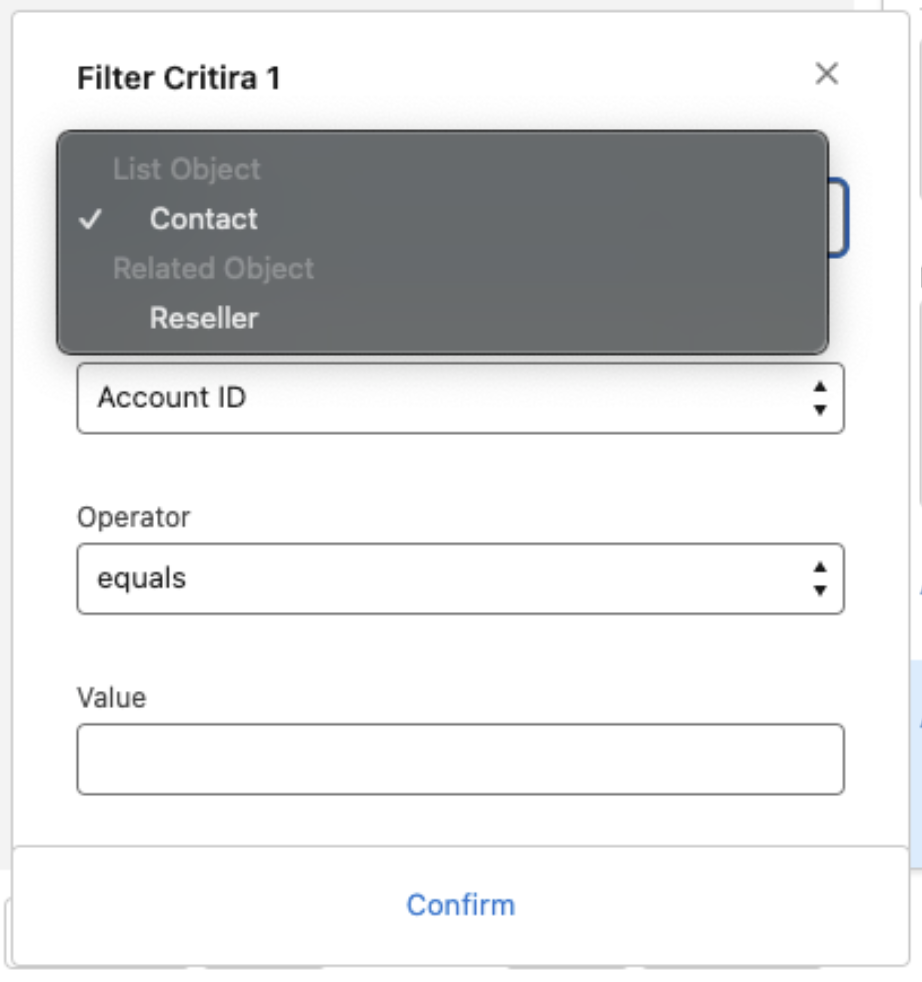
Cross-object filter criteria in PowerDialer
Have you ever needed to create a PowerDialer list of opportunities based on account values?
Good news! With this update, you can now directly select related objects when setting up the PowerDialer filter—no need to create formula fields.
Salesforce Task creation improvements while logging calls
The v1.758 release included a major improvement to efficiently manage Salesforce Tasks while logging calls and prevent storage limits from being reached when modifications were made. However, this led to unintended consequences, disrupting automation and workflows. To address this, we re-evaluated our approach and implemented a solution that modifies tasks intelligently, ensuring storage is not overloaded and automation remains intact.
Dialpad for Salesforce updates
Updates to Dialpad for Salesforce do not require a package update — just open the Dialpad app to see the new features and functionality.
Salesforce-based disposition logging
Call dispositions provide the most efficient way to categorize call outcomes, enabling supervisors to generate reports and track team performance effectively.
Previously, call dispositions were only available with a Support (Contact Center) license. With this update, you can now create dispositions in Salesforce and use them on your calls. Just make sure the allow call disposition setting is enabled.
While logging calls, you'll see a list of dispositions. You can customize this list by modifying the ‘Call Disposition (Picklist)’ field in the Dialpad Call Log object..png)
Log calls to Dialpad Call Log object
We’re giving you more control and flexibility over how Salesforce Tasks are created when logging Dialpad calls. You’ll now have the option to:
Disable Salesforce Task creation and log calls only to the Dialpad Call Log Object, allowing you to leverage Dialpad's AI features.
Log the call in both Salesforce Tasks and the Dialpad Call Log Object for comprehensive tracking.
Log the call only as a Salesforce Task, if that best fits your workflow.
Easier way to find related objects in the CTI
When adding related records during call logging, you can now select custom objects in addition to standard objects. Plus, you’ll have enhanced search options, allowing you to filter by owner, assignee, and in some cases, status.
Currently, this feature is only available in the Salesforce CTI, but we plan to bring it to the Dialpad sidebar widget soon!
New setting: Control Call Logging Requirements
Dialpad automatically creates call log objects in Salesforce for every call, whether made from the Dialpad sidebar or Salesforce CTI. Previously, adding a subject and note was mandatory on the sidebar but not in CTI, creating inconsistencies.
Now, a new setting lets you choose whether subject and note fields should be mandatory for both CTI and the sidebar, ensuring a consistent call logging experience.
February 21, 2025
Salesforce package updates v1.789
To use features in package , you must update your Salesforce package.
‘Call to (First)’ field to identify the original number dialed
Many businesses have a single customer-facing number that routes calls to different departments via an IVR workflow or internal transfers. This means the number a customer dials is often different from the number an agent ultimately receives the call on, making it difficult to measure the effectiveness of customer-facing numbers.
With this update, every Dialpad Call Log will include a new field: "Call to (First)." This field captures the initial number dialed by the customer before any internal transfers.
If a call was transferred internally, the "Call to (First)" field will show the original number dialed, while the "Call to" field will show the final recipient.
If there was no transfer, both fields will contain the same number.
This provides better visibility into call routing and helps analyze the performance of customer-facing numbers more accurately.

Support for Salesforce Apex v50
All the Apex Classes are API v50 or more. This ensures you can use any of the latest Salesforce features, like ICU locale formats. Read more on the Salesforce release notes to understand the benefits you will be getting.
Voicemail bug
Some users reported that their voicemail links were absent from the Salesforce task while logging the call. This has been fixed.
Start dial bug
A few users noted that the ‘Start dial’ option was available even if no records were available for calling in Salesforce Powerdialer. We’ve fixed this.
October 17, 2024
Salesforce package updates v1.777
To use features in package, you must update your Salesforce package.
Performance improvements
Our team updated many behind-the-scenes functions that are a little too small to see (and a little too difficult to explain without going into Software Engineer-speak). We’ll return next month with more "visible" product updates.
August 29, 2024
Salesforce package updates v.1.775
To use features in package, you must update your Salesforce package.
Timezone-Based filtering for Powerdialer
Say goodbye to wasted calls! Our Powerdialer now automatically filters lists by timezone, ensuring your team always reaches prospects at the right time.
Disable capacity management using Salesforce Omnichannel
Need more control over your Salesforce Omnichannel with Dialpad, integration? Now, you can toggle automatic capacity management.
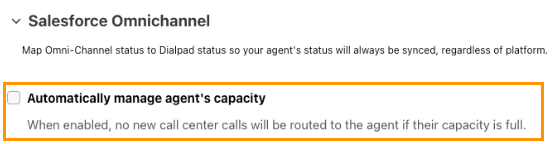
This is ideal for scenarios where you want to update your status without affecting capacity.
August 19, 2024
Salesforce package updates v1.771
To use features in package, you must update your Salesforce package.
Automatically select any related object based on navigation
Dialpad’s Salesforce integration now lets you automatically log calls to a related custom object when you open it in the background. Previously, this functionality was only available to cases and objects.
Content Security Policy (CSP) trusted URLs for Dialpad
To tackle cross-site scripting (XSS) attacks, Salesforce is making changes to its Content Security Policy. Admins will now define trusted URLs to ensure all third-party plugins (like Dialpad) work inside Salesforce. With this release, we ensure these settings are added directly so you don’t have to worry about why Dialpad suddenly stopped working.
July 4th, 2024
Salesforce package updates v1.770
To use features in package, you must update your Salesforce package.
Quality Calls in Salesforce
We recently introduced Quality Calls in Dialpad, which uses Dialpad’s proprietary AI to analyze Coaching Team calls based on key business call metrics to determine if they should be considered for data insights and coaching. Now, in every Dialpad Call Log object, you’ll see the Quality Call field — if the box is checked, you know it was a Quality Call.
.png "sfdc-quality-call(2).png")
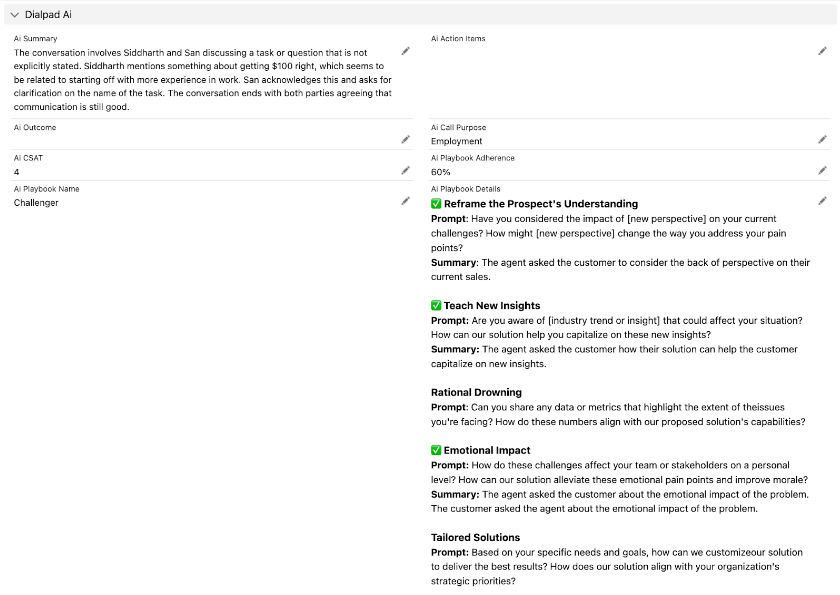
More AI Playbooks data
Not too long ago, we introduced several Dialpad AI features in Salesforce. We know how much you love the data (and value!) that AI Playbooks offer, and we’re excited to bring more of it to Salesforce. Now, you’ll be able to see which AI Playbook questions were used and the answer summary, right in Salesforce.
No more mandatory permission sets
It used to be mandatory to provide ‘Dialpad for Salesforce - Administrator’ and ‘Standard Users’ permission sets for ‘all the users’.
With this update, permission sets are no longer required for non-Dialpad users.
Check the Powerdialer list condition before making a call
Previously, when a dynamic Powerdialer list was created using a supported object, there was a 24-hour delay when a related object was updated.
Now, you no longer need to wait 24 hours. While making a call, we check these filters as an additional measure, and skip calling them if the filter condition is unmet.
June 6th, 2024
Salesforce package updates v1.765
To use features in package, you must update your Salesforce package.
List cloning bug
Some users report that they could not clone Powerdialer lists that contained mandatory custom fields. We have fixed this issue in this release.
May 9th, 2024
Salesforce package updates v1.762
To use features in package, you must update your Salesforce package.
Component bug
We recently started supporting many Dialpad AI features in Salesforce, and some users reported problems when adding the Dialpad AI component to the Task Object. This package update resolves this issue, so you'll want to update your Salesforce Package as soon as possible.
April 1st, 2024
Salesforce package updates v1.760
To use features in package, you must update your Salesforce package.
Behind-the-scenes improvements
In this release, our team focused on polishing your favorite details, fixing minor bugs, and enhancing a few small features, improving your overall experience with Dialpad for Salesforce.
March 1st, 2024
Salesforce package updates v1.758
To use features in package, you must update your Salesforce package.
AI Recaps in Salesforce
If you're a part of our AI Recaps Early Adopter Program, you'll now be able to log AI Recaps (and additional Dialpad AI features) in Salesforce!
The Dialpad Call Log Object will include a new section called Dialpad AI that contains the following fields:
Recap
Action Items
Outcome
Call Purpose
CSAT
Playbook Adherence
These details will be visible on the contact page, and lets supervisors report on not only the client experience, but also their rep's performance.
Hyperforce support
The Dialpad for Salesforce integration now supports Salesforce Hyperforce.
Hyperforce is the next-generation Salesforce infrastructure architecture, built for the public cloud. Hyperforce infrastructure is composed of code rather than hardware, so that the Salesforce platform and applications can be delivered rapidly and reliably to locations worldwide, giving customers more choice and control over data residency.
Call logging improvements
This package update includes a much-improved call logging experience.
With these improvements, you'll notice the call logging process is faster, more efficient, and more reliable.
Deleting associated standard objects now deletes tasks
We've made some updates to the call logging and task association processes.
Now, when you remove an association, the respective tasks are deleted. This ensures that no unused tasks occupy your storage. If you change the association (perhaps as part of an automation or workflow), you may notice the tasks are deleted.
Additionally, if custom call logging is enabled and you update the Dialpad call's WhoID and WhatID, the task will be deleted, and a new task will be created.
We suggest you clone the Task object and modify the fields to avoid this.
February 4th, 2024
Salesforce package updates v1.754
To use features in package, you must update your Salesforce package.
Powerdialer performance improvements
This package update includes improved Powerdialer performance when processing more than 10,000 records.
Whether you are an enterprise company, or a growing business, dealing with large records will no longer hinder your progress. We have optimized the Powerdialer to deal with large-scale record management easily. Be it bulk uploading, updating, adding, or filtering records, rest assured that your actions will work without a hiccup!
Large record loading in Salesforce Classic bug
We've fixed the inability to load large records in the Manage Users screen of Salesforce Classic.
Powerdialer timezone filter bug
A few users reported that their Powerdialer filters did not function if they added a timezone filter as well. This has been fixed.
December 1st, 2023
Salesforce package updates v1.749
To use features in package, you must update your Salesforce package.
Powerdialer exclusion criteria omission bug
When creating a dynamic Powerdialer list, exclusion criteria were sometimes ignored. This bug has been fixed.
Screenpop loading delay with high volumes
Some users reported a loading delay when loading more than 1000 cases or opportunities when using Screenpop. We have fixed this problem!
Opportunity creation bug
A few users noted that they had to grant permissions whenever using automations to create opportunities. This issue has been fixed.
Dynamic list creation bug
Some users reported that the Powerdialer Dynamic lists often failed to update when they had identical contacts. We have added a fix for this workflow.
Redundant logs for custom objects bug
For some custom objects, many duplicate logs were created for call logging. We have fixed this behavior.
October 27th, 2023
Salesforce package updates v1.744
To use features in package, you must update your Salesforce package.
Powerdialer list creation improvement
Users are now restricted from creating a Power Dialer list while in active State. Whenever a new Power Dialer list is created, it will default to a deactivated state until activated by users.
Multiple task bug
Some users reported that multiple tasks were being created when an unknown number was linked to a case. This has been resolved.
Component error bug
A few users reported pop-up notifications from Salesforce during their active calls, displaying an error message "Component error has occurred." This has been fixed.
September 29, 2023
Salesforce package updates v1.740
To use features in package, you must update your Salesforce package.
Filter change capability disabled for active lists
When a list is active, the 'List filter updated' option will be disabled. Filters can now only be edited when the list is deactivated.
September 1st, 2023
Salesforce package updates v1.736
To use features in package, you must update your Salesforce package.
“Relate to” improvement
The Relate To drop-down list now supports more than 20 custom objects.
Timezone support for Power Dialer calls
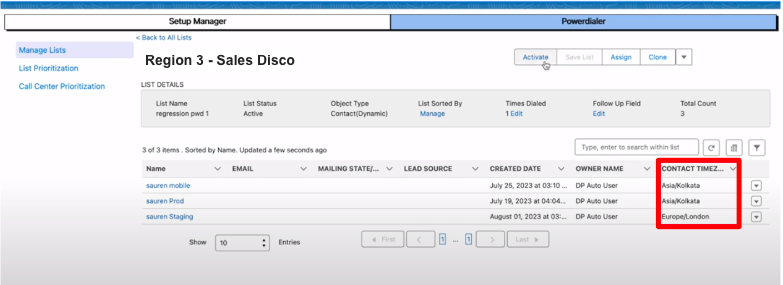
We added a timezone field for records (leads, contacts, and accounts). customers to define their preferred time to attend calls and makes sure they will not be dialed outside of the specified time. For example, customers can indicate their availability for calls between 9 AM and 5 PM or 10 AM and 6PM. You'll see the record's timezone details listed in your Power dialer List.
August 4th, 2023
Salesforce package updates v1.730
To use features in package, you must update your Salesforce package.
This package update offers the following new features:
Direct line messages (1:1)
Shared lines (Contact Center or Department)
Group SMS
PowerDialer Exclusion Settings improvements: Users can exclude records from lists based on certain criteria, including list creation and filter updates. The exclusion logic will be applied to existing records automatically, allowing users to exclude records from lists in a more flexible and efficient way.
Hide/Exclude closed cases when matching contacts: With this enhancement, closed cases are hidden from view when the user has selected to show the open cases associated with contact during contact matching.
Timezone Support: With this enhancement, clients will be called only during their desired availability.
Enhanced Control over Dialpad Queue Records: Admins now have the ability to hard-delete the Dialpad queue records using settings in Dialpad for the Salesforce package.
This feature must be manually enabled, please contact Dialpad support for activation
Controlled Creation of Dialpad Activity Logs: Admins can restrict the creation of activity logs based on specific settings.
This feature must be manually enabled, please contact Dialpad support for activation
Comment bug
Some users reported that Salesforce comments were logging twice. We've fixed this.
Task update bug
A few users reported that when they selected a related object logging from either the Dialpad app or Salesforce CTI, the standard task was not updated with all the necessary details (Dialpad Call Recording URL, Dialpad Call End Time, Subject, Disposition Notes, Updated/Recent Comments). This has been fixed.
Simplified Picklist values
Picklist values are now presented as comma-separated entries.
Accurate record count bug
Some users reported that the activity page count was displaying incorrectly after adding records to a list. This has been fixed.