Dialpad's Digital Sessions report provides insight into how each agent handles digital customer conversations, grouped at the agent session level.
It surfaces key information, helping you evaluate digital performance, identify coaching opportunities, and understand how effectively your team and AI are resolving digital inquiries.
Let's get into the details of this report.
Who can use this
The Digital Sessions report is available for Dialpad users with the Dialpad BI add-on who are Company Admins or have Analytics-specific permissions.
You'll also need to be on a Dialpad Support or Dialpad Sell plan.
Default Filters
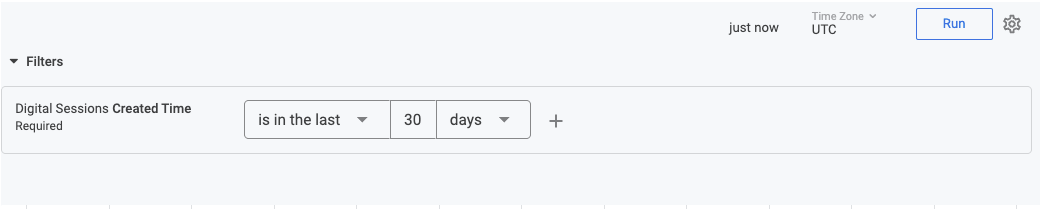
This report contains a required filter that sets the time range for the report:
Visualization Type
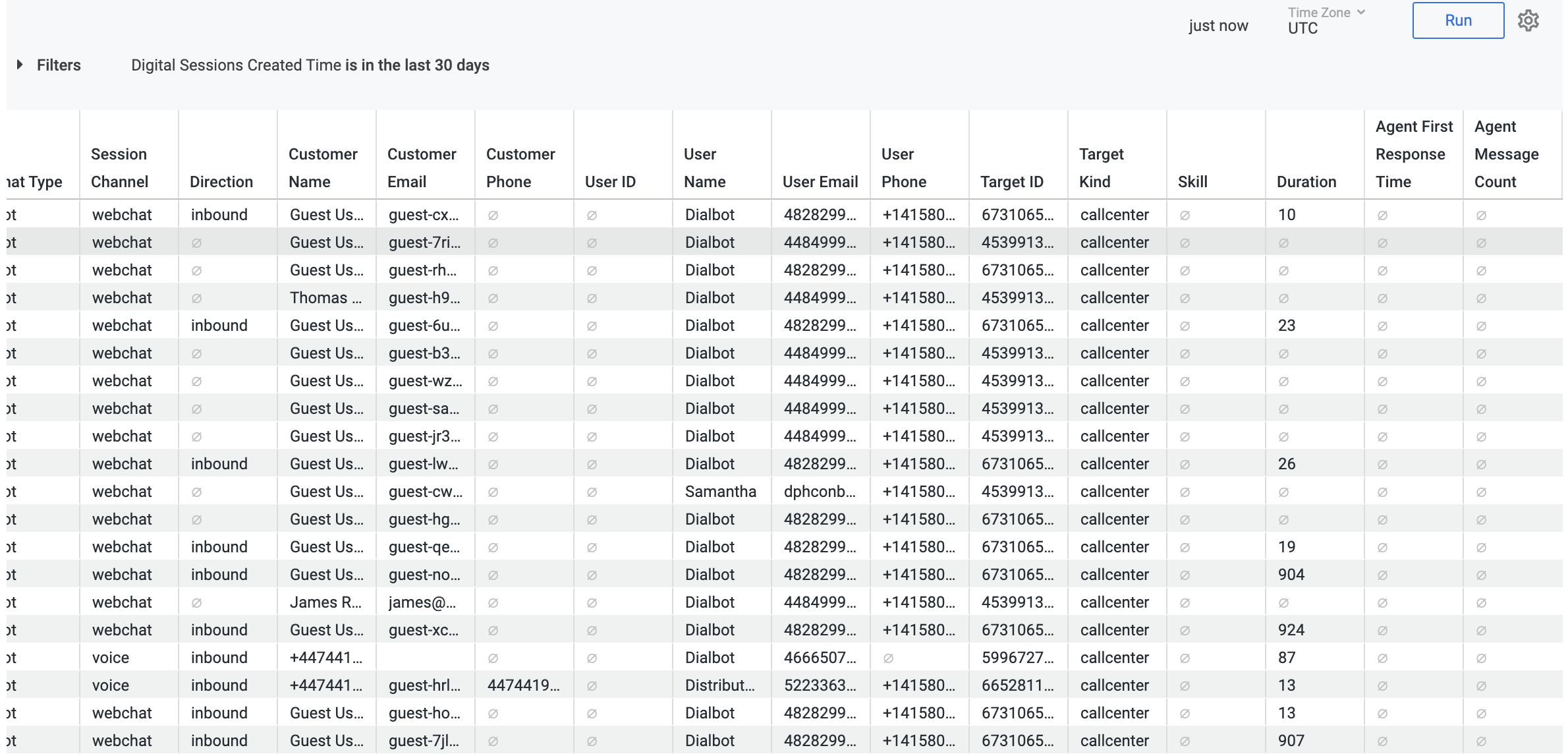
The Digital Sessions report is a templated report displayed in a table format.
Select Settings (the gear icon) > Download to save your data to your computer, with multiple formatting and selection options.
Data Dictionary
This report contains unique Analytics definitions — read through the following table to learn more about the data in your report.
Customer Session ID | A unique alphanumeric identifier assigned to a specific interaction. Use this to track a single customer journey across the system. |
Created / Ended Time | Timestamps indicating exactly when a session began and when it was finalized. |
Chat Type | Categorizes the interaction (e.g., "bot"), helping you distinguish between automated assistance and human-led chats. |
Session Channel | The platform where the chat took place, such as webchat or voice. |
Direction | Indicates the flow of communication; inbound represents a customer reaching out to your team. |
Customer Name / Email/ Phone | The identity and contact details of the customer. For unauthenticated users, these often appear as "Guest User." |
User Name/ ID/Email/Phone | The name of the specific agent, their ID, or the AI agent that handled the session. |
Target ID / Kind | The destination of the session, such as a specific Contact Center ID, used for routing and organizational tracking. |
Billable (Yes / No) | Indicates whether the specific session counts toward your monthly usage or billing quota. |
Duration | The total length of the session in seconds. High duration may indicate complex issues or high engagement. |
Customer CSAT Score | The satisfaction rating provided by the customer at the end of the session, typically on a scale of 1–5. |
AI CSAT Score | A predicted satisfaction score generated by AI based on the sentiment and resolution of the conversation. |
Skill | Expertise used for the users |
Agent first response time | Time taken to send the first message |
Agent message count | Total messages the agent handled in that session |
Dimension Names and Definitions
You'll find these terms in your exported data:
agent_first_response_time | The time taken by the agent to send the first message, in seconds. |
agent_message_count | The count of messages sent by the agent in the session. |
agent_wrapup_time | Time spent in wrap-up in seconds. |
aicsat_score | The AI CSAT score. |
aicsatx_score | The AI CSATX score. |
billable | Whether this session is billable. |
cause | The end cause of the session. |
chat_type | The type of the session. |
company_id | Company ID. |
created | The timestamp when the session was created. |
csat_score | The CSAT score. |
customer_channel_email | The email address associated with the customer's channel identity. |
customer_channel_id | A unique ID for the customer's channel identity. |
customer_channel_name | The name associated with the customer's channel identity. |
customer_channel_phone | The phone number associated with the customer's channel identity. |
customer_csat_score | The customer CSAT score. |
customer_email | The email address of the customer. |
customer_id | Customer ID. |
customer_name | The name of the customer. |
customer_phone | The phone number of the customer. |
customer_session_id | A unique ID of the customer session that this session belongs to. |
direction | The direction of the session. |
disposition | Comma-separated list of disposition tags assigned to the session. |
call_id | Call ID associated with the session. |
call_uuid | Call UUID associated with the session. |
master_call_id | Master call ID associated with the session. |
duration | The duration of the session in seconds. |
ended | The timestamp when the session ended. |
skill | Expertise tag associated with the session. |
kare_engine_type | The engine type used for the customer session. |
widget_id | AI Agent widget ID associated with the session. |
widget_locale_id | Widget-locale combination (widget_id-locale) associated with the session. |
locale | AI Agent locale associated with the session. |
last_state | The last state of the session. |
queued_status | Queued status of the session if the customer was queued |
session_account_email | The email address associated with the channel. |
session_account_id | A unique ID for the channel. |
session_account_name | The name associated with the channel. |
session_account_phone | The phone number associated with the channel. |
session_channel | The channel used for the session. |
session_id | Session ID associated with the session. |
survey_status | The survey status for the session. |
tags | Comma-separated list of tags associated with the session.< |
target_id | A unique ID for the Target. |
target_kind | The type of the Target. |
user_group_id | User group ID associated with the session. |
user_group_name | User group name associated with the session. |
user_id | User ID associated with the session. |
user_email | The user's primary email address. |
user_name | The user's display name. |
user_phone | The user's phone. |
sessions_count | Total count of sessions. |
avg_handle_time | Average handle time (seconds) for the session. |
avg_first_response_time | Average Agent First Response time (seconds) for the session. |
Note
For more information on BI's datasets and notable concepts, be sure to review this Help Center article.