Dialpad's Digital Customer Sessions Volume by Channel report provides insight into how many digital customer sessions your team handles across each messaging channel, grouped by channel type.
It displays the volume of unique customer sessions over time, broken out by webchat, WhatsApp, SMS, and other configured digital channels. The report helps you understand which channels customers use most and how digital demand trends over time.
Let's get into the details of this report.
Who can use this
The Digital Customer Sessions Volume by Channel report is available for Dialpad users with the Dialpad BI add-on who are Company Admins or have Analytics-specific permissions.
You'll also need to be on a Dialpad Support or Dialpad Sell plan.
Default Filters
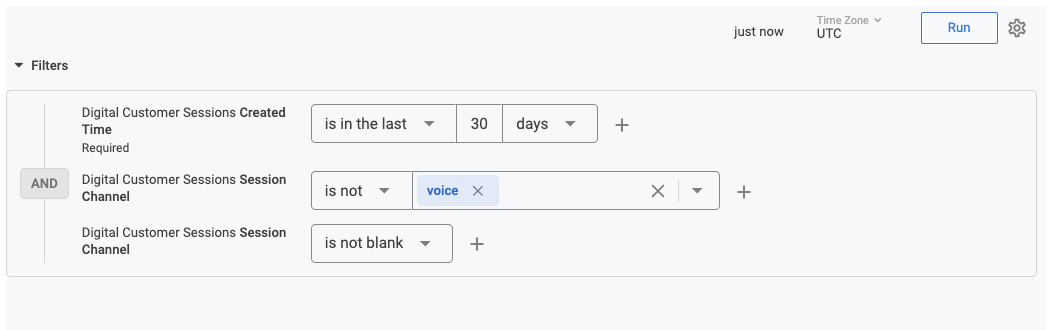
This report contains 3 default filters:
Digital Customer Sessions Created Time
Digital Customer Sessions Session Channel (channel type)
Digital Customer Sessions Session Channel (channel attribute)
Visualization Type
The Digital Customer Sessions Volume by Channel report is a templated report displayed in a bar graph format. The configured channels will show up on the visualization.
.png)
Select Settings (the gear icon) > Download to save your data to your computer, with multiple formatting and selection options.
Data Dictionary
This report contains unique Analytics definitions — read through the following table to learn more about the data in your report.
Created Date (X-Axis) | Displays the daily volume of customer interactions over the last 30 days. |
Customer Sessions Count | The total number of unique parent sessions initiated by customers. |
Webchat (Yellow) | Represents interactions occurring through your website's chat widget. |
WhatsApp (Red) | Represents interactions occurring through the WhatsApp integration. |
SMS (Blue) | Represents interactions occurring via mobile text messaging. |
Filters Applied | Your view is currently filtered to exclude Voice and Blank channels, focusing purely on digital text-based threads. |
Note
For more information on BI's datasets and notable concepts, be sure to review this Help Center article.