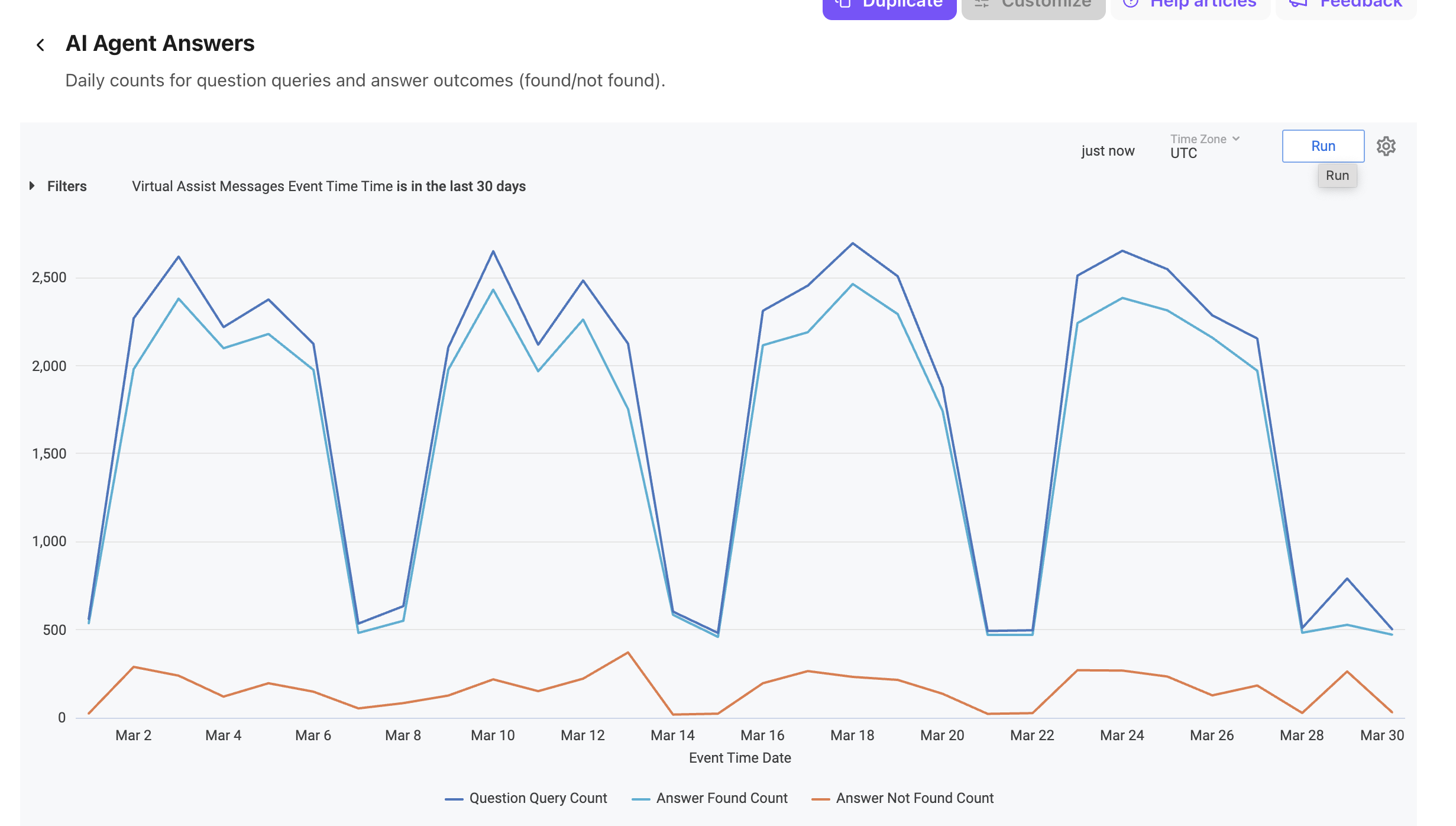
Dialpad's AI Agent Answers report provides insight into how your AI Agent is used across digital conversations, grouped by the query outcome.
It surfaces key metrics such as the total number of questions asked, how many received an answer, and how many returned no answer, helping you understand AI coverage and spot knowledge gaps.
Let's get into the details of this report.
Who can use this
The AI Agent Answers report is available for Dialpad users with the Dialpad BI add-on who are Company Admins or have Analytics-specific permissions.
You'll also need to be on a Dialpad Support or Dialpad Sell plan.
Default Filters
This report contains a required filter that sets the time range:

Visualization Type
The AI Agent Answers report is a templated report displayed in a line chart format.
Select Settings (the gear icon) > Download to save your data to your computer, with multiple formatting and selection options.
Data Dictionary
This report contains unique Analytics definitions — read through the following table to learn more about the data in your report.
Question Query Count | Total questions asked |
Answer Found Count | Total answers found to the questions |
Answer Not Found Count | Total answers not found for the questions |
Dimension Names and Descriptions
You'll find these terms in your exported data:
Description | |
aspect | Message aspect associated with the event |
company_id | Company ID |
conversation_id | A unique ID for the conversation |
event_ts | Event Time |
target_id | A unique ID for the target (e.g., Contact Center) |
target_kind | The type of the target (e.g., Contact Center) |
knowledgebase_id | Identifier of the knowledge base |
license_type | License type associated with the message |
locale | AI Agent locale for this message (xx-XX) |
msg_id | Unique identifier for the message |
office_id | Identifier of the office |
parent_id | Identifier of the parent message, if any |
query_intent | Inferred intent of the inbound query |
trigger_id | Identifier of the trigger event |
trigger_intent | Intent associated with the trigger event |
trigger_uri | URI of the trigger event |
uri | Message URI (direction/type) |
user_id | Identifier of the user associated with the message |
widget_id | Identifier of the widget associated with the message |
is_answer | Whether the message is an outgoing text response |
is_answer_found | Whether the answer was found or required disambiguation |
is_feedback_event | Whether the event is a feedback click (thumbs up or down) |
is_feedback_down_event | Whether the event is a thumbs-down feedback click |
is_feedback_up_event | Whether the event is a thumbs-up feedback click |
is_query_message | Whether the message is a query (uri = 'in/query') |
is_top_level | Whether the message is top-level (no parent) |
is_triggered_by_query | Whether the message was triggered by an inbound query |
answer_count | Number of answer messages sent in response to a query message |
question_query_count | Count of all query messages with question intent |
answer_found_count | Number of unique query messages that received a valid first answer |
answer_not_found_count | Count of query messages that did not receive a valid first answer |
total_query_count | Total number of query messages |
chatter_query_count/p> | Number of query messages with chatter intent |
agent_requested_query_count | Number of query messages with escalation intent |
other_query_count | Number of query messages not classified as a question |
feedback_count | Count of feedback (Thumbs up or down) events |
feedback_down_count | Count of thumbs-down feedback events |
feedback_up_count | Count of thumbs-up feedback events |
count | Total number of messages |
Note
For more information on BI's datasets and notable concepts, be sure to review this Help Center article.