Dialpad standardizes recording and transcription greetings across inbound calls to create a clear, consistent experience for callers and make greeting management easier for admins.
Who this impacts
This applies to inbound calls only for Contact Centers, Departments, and Mainline numbers.
Outbound calls are not affected.
How to update your call recording greeting
To update the call recording greeting for your Contact Center, Department, or Mainline, go to the Dialpad Admin Portal.
Navigate to the Contact Center, Department, or Mainline
Select Advanced Settings
Navigate to Automatic Call Recording and Transcription > Call recording greeting
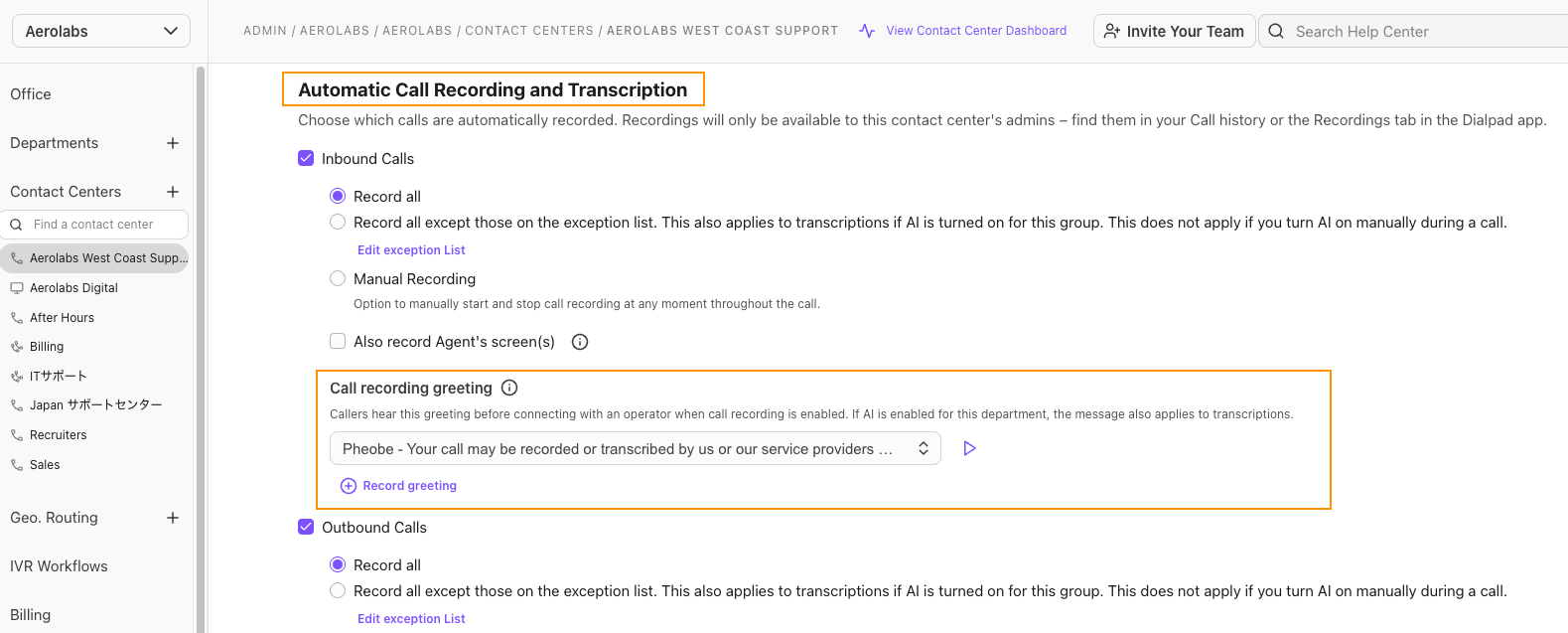
To set the call recording greeting, select a default message from the drop-down menu, or select Record greeting to record your own using our Text-To-Speech (TTS) option.
Our TTS tool is simple: just write your script in the text box, choose the language and voice, and we’ll take care of the rest.
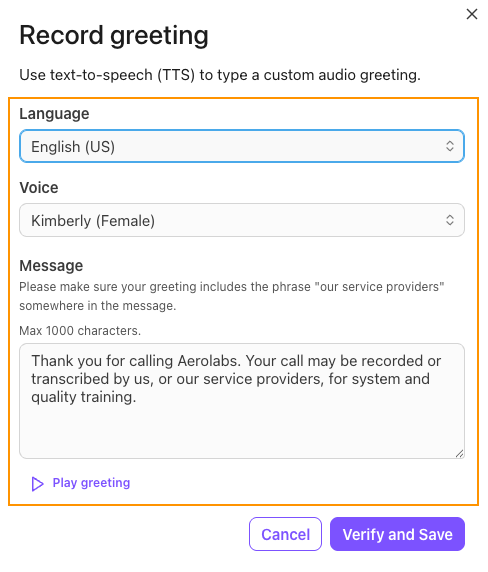
Tip
Press the Play button to hear each recording option, including your own.
What needs to be included in your call recording greeting
Call recording greetings must clearly inform your callers that the call may be recorded and/or transcribed by us and our service providers.
A greeting is eligible if it conveys two things:
Call recording/transcription is in use: Clearly tells the caller that their call may be recorded or transcribed.
A third party is involved: Makes it clear that a 3rd party may perform the recording or transcription (e.g., a partner or service provider).
Expand the box below to see examples of acceptable and unacceptable call recording greetings.
Examples
An exact script match is not required; let’s look at some examples of the types of greetings that will be accepted.
✅ Acceptable greetings
“This call may be recorded or transcribed by us and our service providers for quality assurance.”
“Thank you for calling AeroLabs. Your call is recorded and transcribed by our partners to ensure a quality experience.”
“Welcome to AeroLabs. Calls are recorded by our service providers to…”
❌ Unacceptable greetings
“This call may be recorded for quality purposes.”
“We might record this call for training purposes.”
(Reason: No mention of transcription or service providers.)
Why call recording and transcription greetings matter
Having a clear and detailed call recording and transcription greeting is important because it provides:
Clarity for callers: When recording or transcription is active, every caller hears a consistent message, setting clear expectations from the start.
Transparency and trust: Clear notifications help build confidence and ensure everyone understands when recording or transcription takes place.
Efficiency: Centralized management and TTS tools simplify how greetings are created, updated, and maintained.
Scalability: Standardization supports a unified caller experience across teams while still allowing controlled customization where needed.
Frequently asked questions
What if my welcome greeting already includes a compliant disclosure?
If your Open Hours Welcome Greeting has been verified, you can streamline your caller experience by removing the redundant second disclosure that plays when an agent answers.
When you create a using Dialpad’s Text-to-Speech (TTS) tool with the required language, it is automatically verified and you’ll see a "Verified" badge next to your greeting.
Once the greeting has been verified, select the "No Message" option from the line’s settings. 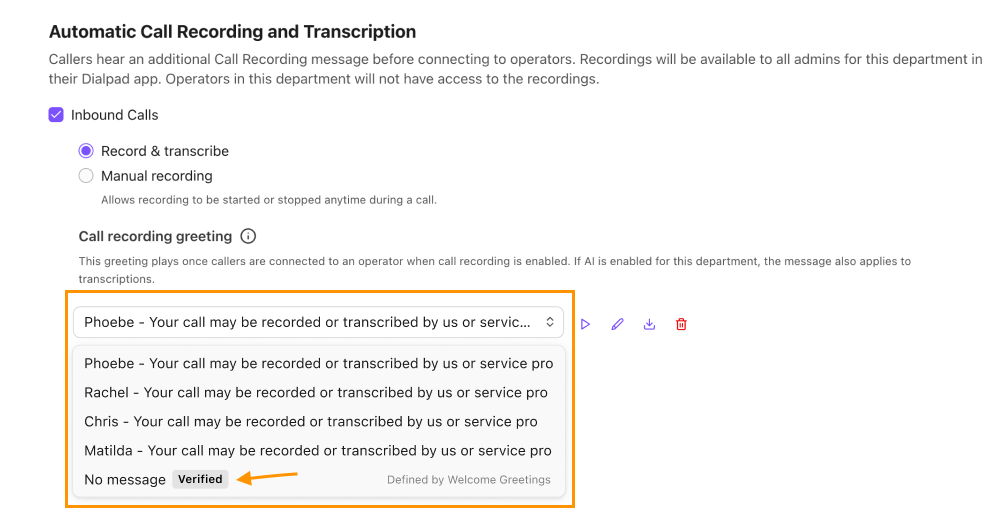
Notes
The “No Message” is only available when the IVR greeting is verified as compliant.
If you use a manually recorded or uploaded MP3 file that already contains the disclosure, the "No Message" option will remain disabled until the file has been manually reviewed by a member of the Dialpad Customer Care team.
If you have "No Message" selected and then change your Welcome Greeting to a new, unverified file, the system will:
Immediately revoke the verification status.
Disable the "No Message" selection.
Auto-revert to playing the default system disclosure to ensure you remain legally compliant.
Do I have to use a call recording greeting for calls?
Call recording greetings are mandatory for recorded or transcribed calls.
What if I don’t want transcription mentioned?
The updated wording is current best practices and Dialpad requires it for better transparency for your callers.
What if I don’t have a call recording greeting?
If you don’t have a call recording greeting, Dialpad will apply a default notification. You can update this at any time from your Admin Settings using our Text-to-speech functionality.
Does my IVR menu need to be a certain length?
For the best caller experience and to meet industry "Fair Use" standards:
Keep the main menu greeting under 30 seconds.
Limit menu levels to no more than three deep (Main Menu > Sub-Menu > Department).
Always list the most common option first.