Questions about workflows? Don't worry, we've got you covered.
Let’s go over common questions about Dialpad's Workflows.
What happened to IVR Workflows?
IVR Workflows have been rebranded as Workflows. While the core functionality remains the same, the builder features a new look and feel for an optimized experience. Your existing flows are now categorized as Voice Workflows and can be managed directly within the new interface. In menus such as Routing Options, you will now see them referenced as "Workflows (Voice)”.
Why don’t I see the Workflows menu in my Office Settings?
Only Office and Company Admins can configure Workflows. Workflows must be enabled at the company level. Self-enablement is for all companies.
Are Workflows PCI compliant?
No. Workflows are currently not PCI compliant.
Are Workflows HIPAA compliant?
Yes! Check out this Help Center article for more details about HIPAA.
Is there a maximum number of steps that can be used in a workflow menu?
Yes, the maximum number of steps is 70. To manage larger use cases more easily, we suggest splitting your application into separate functional workflows and using the Go-To step to reference other functional areas.
Why isn’t Operator Fallback working?
Operator Fallback only works if all operators are off-duty. It will not activate if the hold queue is full or the operator misses a call.
Note
If you select Operator, you can select an Operator fallback option in case an operator isn’t available. The default fallback option is Voicemail.
.png)
Can admins edit and delete any workflows, or only the ones they create?
Administrators have full access to all workflows created for their company. However, an IVR workflow can only be deleted when the IVR has no entry points.
Can multiple workflows be assigned to a single Office, Contact Center or Department?
You can only apply one workflow at a time. However, you can call multiple workflows based on your workflow conditions (ex, using the Go To option).
You can also choose a different voice workflow for your open and closed routing options.
Are there any analytics for workflow performance?
Phone number and routing analytics are available now. Call flow analytics are coming soon.
Why doesn’t the 'IVR Menu' tab on the analytics page show my workflows?
The 'IVR Menu' tab on the Analytics page displays data for shared lines with an automated response menu (often called an IVR menu). This tab is not for analytics related to Workflows.
What happens when a call fails?
When a call fails, the caller is transferred to the default voicemail setting.
You can set a fallback option for each workflow step to specify where callers are sent in case of a call failure.
Why aren't my changes live?
When editing a workflow, you must select Publish to publish your changes.
Save lets you work on an IVR flow and save changes without activating them. This is especially useful if you would like a colleague to review the updated flow.
Is there a cost for Workflows?
Your Dialpad plan includes standard workflows. However, if you need Expert Mode for advanced API calls, CRM integrations, notifications, and other extended features, you must invest in additional professional services. Contact your CSM or our Sales team for more information.
Can I create a workflow for a digital contact center?
Currently, no. However, we are working toward providing that capability soon. Stay tuned!
Why did I get an error message when I tried to publish my workflow?
You may be missing information in some steps, such as:
Missing step in a default branch
A Go-to step is pointing to a step which was deleted
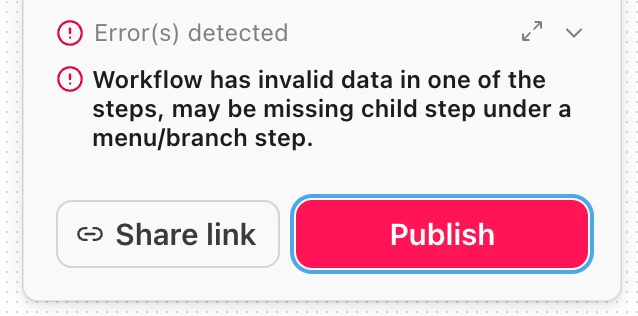
Go back and review your workflow steps to ensure you aren’t missing any information.