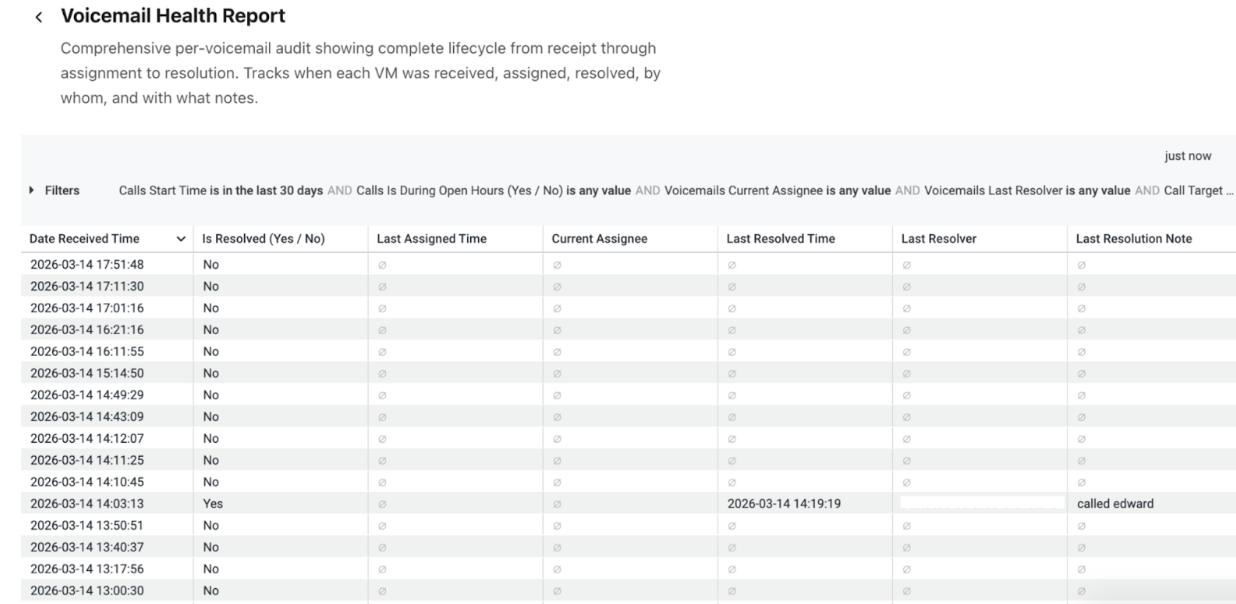
The Voicemail Health Report provides a comprehensive audit trail for each voicemail, capturing its lifecycle from receipt through assignment and final resolution. This report allows teams to track operational handling of voicemails at a granular level, including timestamps for receipt, assignment, and resolution, as well as the agents involved in each stage.
The report helps supervisors and administrators monitor voicemail processing health, operational accountability, and resolution timelines. It can be used to identify unassigned or unresolved voicemails, track ownership, and review notes associated with voicemail resolutions.
Let's get into the details of this report.
Who can use this
The Voicemail Health report is available for Dialpad users with the Dialpad BI add-on who are Company Admins or have Analytics-specific permissions.
You'll also need to be on a Dialpad Support or Dialpad Sell plan.
Default Filters
This report contains five default filters:
Calls Start Time (Required)
Calls Is During Open Hours (Yes/No)
Voicemails Current Assignee
Voicemails Last Resolver
Call Target Name

Visualization Type
The Voicemail Health report is a templated report displayed in a table format. Each row represents an individual voicemail instance and its lifecycle details.
Select Settings (the gear icon) > Download to save your data to your computer, with multiple formatting and selection options.
Data Dictionary
This report contains unique Analytics definitions — read through the following table to learn more about the data in your report.
Date Received Time | The timestamp indicating when the voicemail was originally received by the system. This marks the start of the voicemail lifecycle. |
Is Resolved (Yes / No) | Indicates whether the voicemail has been resolved. "Yes" means the voicemail was handled and marked complete; "No" means it is still pending or unresolved. |
Last Assigned Time | The most recent timestamp when the voicemail was assigned to an agent or queue for handling. |
Current Assignee | The agent currently responsible for handling the voicemail. If the voicemail has not yet been assigned, this field may remain empty. |
Last Resolved Time | The timestamp when the voicemail was last marked as resolved. This indicates when the handling process was completed. |
Last Resolver | The name of the agent who last resolved the voicemail. |
Last Resolution Note | The most recent note added when resolving the voicemail. This typically contains context about the action taken |
Note
For more information on BI's datasets and notable concepts, be sure to review this Help Center article.