---
title: "View Your Dialpad Billing Summary"
slug: "view-your-dialpad-billing-summary"
description: "Manage your billing summary and make sure that your account is in order. "
tags: ["invoice", "licenses", "Billing and payments", "fees", "taxes", "Billing Summary"]
updated: 2025-12-11T22:56:54Z
published: 2025-12-11T22:56:54Z
---

> ## Documentation Index
> Fetch the complete documentation index at: https://help.dialpad.com/llms.txt
> Use this file to discover all available pages before exploring further.

# View Your Dialpad Billing Summary

We know how important it is to keep your accounts in order. From our Billing Summary, you can view the full details of your payment history, download past invoices, review the exact breakdown of your plan, examine your next bill, and more.

Let's dive into the details.

## **Access your bill**

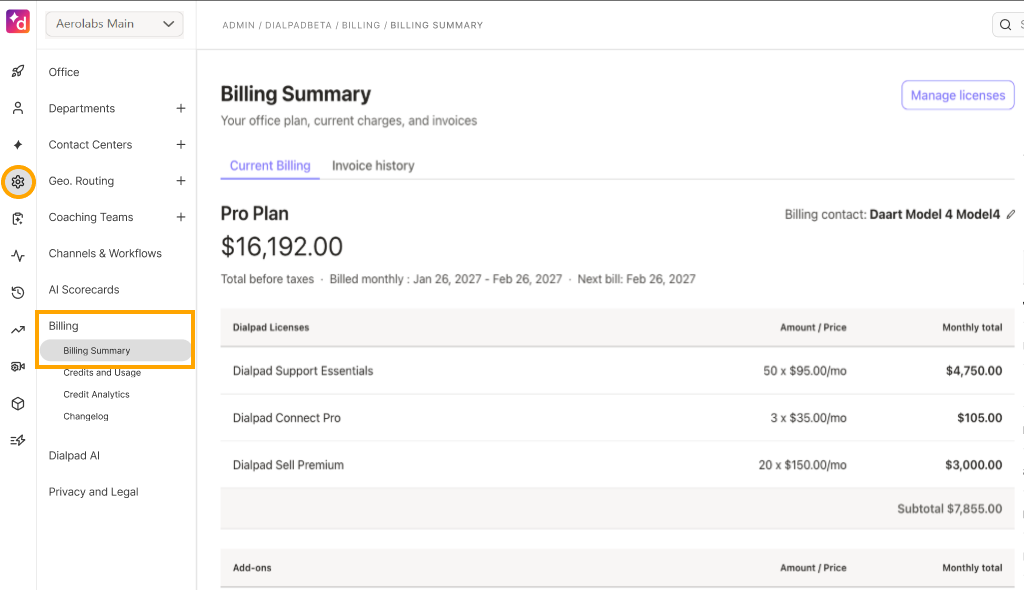
To access your Billing Summary, go to your **Dialpad Admin Settings.**

1. Select **Billing**
2. Select **Billing Summary** ![](https://cdn.us.document360.io/0f28ad44-2863-4372-a27e-c6728808d742/Images/Documentation/billing-summary(3).png)

Your Billing Summary is divided into three sections:

- **Current Plan:** Provides a top-level overview of what you're currently paying for, an estimate of your next monthly billing statement, and when your next billing statement is due.
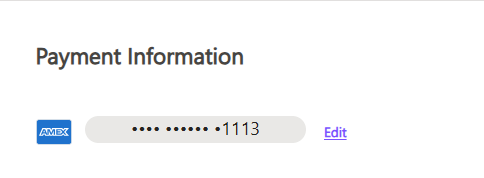
- **Payment Information:** Displays current credit card on file, and provides the ability to update the payment method.
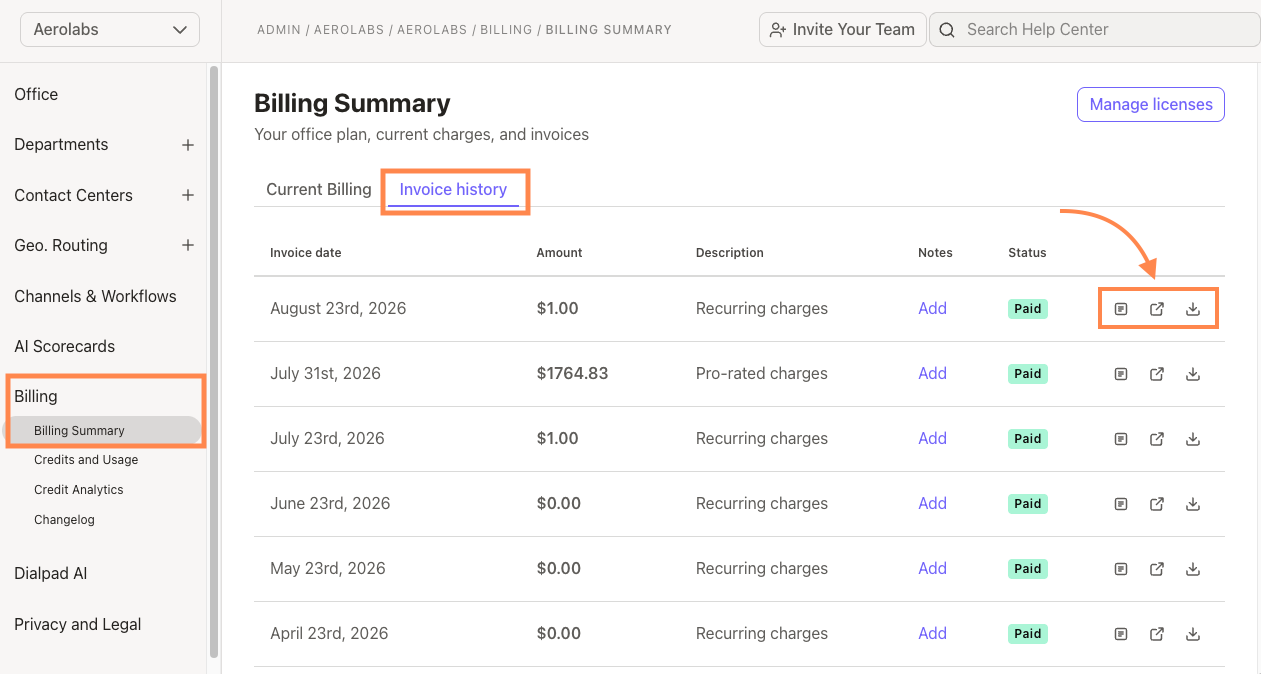
- **Billing History:** This shows a chronological list of your past statements and offers the ability to download a PDF of each bill (click the billing date to view). You can also add a note to your invoice.

## **View billing history**

The Billing History section displays your current and past bills.

To see your Billing History, head to your **Billing Summary,**then navigate to **Billing History.**

[YouTube video player](https://www.youtube.com/embed/H7B_i-A8pqU?si=6IxfOnjCrd4W71mt&amp;start=45) Your Billing History displays the following details:

- Invoice date
- Invoice amount
- Status (paid or owing)
- Invoice description
- Notes

## **Add a note to your bill**

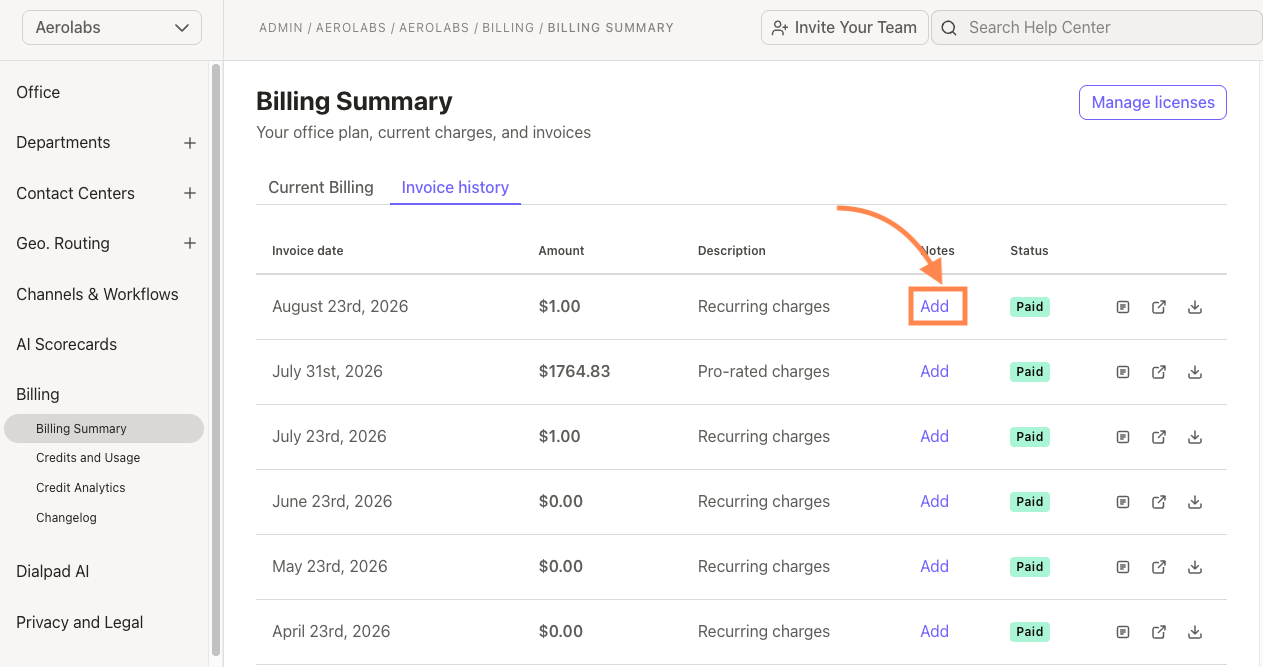
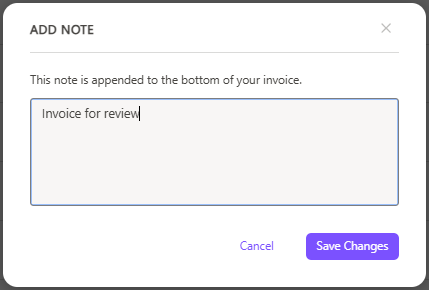
To add a note (visible to both your company, and Dialpad), go to your **Billing Summary.**

1. Navigate to **Billing History**
2. Select **Add note** ![](https://cdn.us.document360.io/0f28ad44-2863-4372-a27e-c6728808d742/Images/Documentation/add-billing-note.png)
3. Enter your note
4. Select **Save Changes**

This message will now be visible at the bottom of your invoice.

## **What you're paying for**

Charges are broken out by the number of users, room, and/or fax lines on your account, as well as by local and toll-free lines. Any changes to the number of lines you made mid-cycle will be listed additionally.

Below your account charges are taxes and fees.

These local, state, and federal assessments are based on your Company’s billing address. Select **Show** to view each item in detail.

[YouTube video player](https://www.youtube.com/embed/H7B_i-A8pqU?si=1Lkf6Adjcb0wURkp&amp;)

> [!TIP]
> **Tip**
> 
> Interested in more savings? Upgrade to annual billing!

## **Update payment info**

Need to update your payment information? No problem!

To update your payment info, go to your **Billing Summary.**

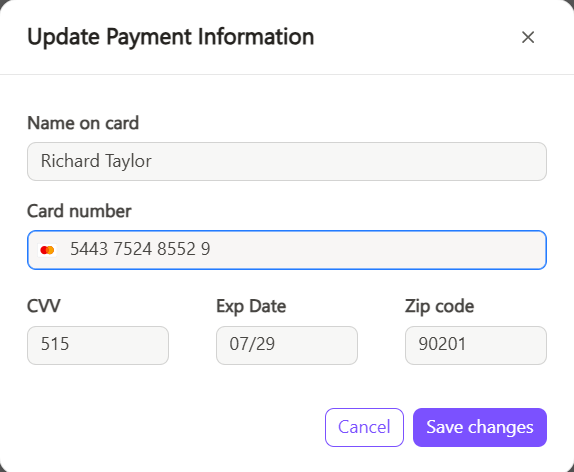
1. Navigate to **Payment Information**
2. Select **Edit** ![](https://cdn.us.document360.io/0f28ad44-2863-4372-a27e-c6728808d742/Images/Documentation/update-payment.png)
3. Enter the new payment information
4. Select **Save**

Your payment information will be updated within 24 hours.

## **Upgrade your account**

On a trial and ready to upgrade to a paid account? Navigate to **Dialpad.com > Admin Settings > Billing > Billing Summary > Upgrade Account**

**![UpgradeAccountfromTrial.png](https://cdn.us.document360.io/0f28ad44-2863-4372-a27e-c6728808d742/Images/Documentation/upgradeaccountfromtrial.png)**

Looking to upgrade from Standard to Pro? Dialpad Admins can upgrade their team straight from their Billing Summary page.

When you upgrade you'll receive a prorated charge for the new plan. Keep in mind that in order to self-upgrade to Pro, your account will need to:

- Be currently active (not in a trial or on hold)
- Only have 1 Office
- Be paid by credit card

![unnamed__6_.png](https://cdn.us.document360.io/0f28ad44-2863-4372-a27e-c6728808d742/Images/Documentation/unnamed__6_.png)

If you need 100 or more user accounts, [reach out to our sales team directly](mailto:sales@dialpad.com).

## Billing Change Log

Easily view all updates made to your office, including license add-ons and removals, right from the Change Log.

To access the Change Log go to your **Dialpad Admin Settings.**

1. Select **Billing**
2. Select **Changelog** ![](https://cdn.us.document360.io/0f28ad44-2863-4372-a27e-c6728808d742/Images/Documentation/changelog.png)

Here, you can filter by user or month, and quickly export the data as a CSV file.

## **Taxes and fees**

Dialpad charges taxes and fees associated with providing telephony services. This section goes over items that you may see on your billing statement.

**SMS Messaging Registration — Brand Registration**

Brand registration fees are billed in accordance with the mandatory [SMS Registration process](/v1/docs/text-message-campaign-registry-for-dialpad-customers).

Brand registration fees apply for every brand application. Costs will vary depending on your brand, you may see charges for Brand Registration and/or Brand Vetting.

**SMS Messaging Registration — Campaign Registration**

Campaign registration fees are billed in accordance with the mandatory [SMS Registration process](/v1/docs/text-message-campaign-registry-for-dialpad-customers).

You will have a one-time setup fee for your Campaign registration, with monthly recurring fees that vary depending on your type of messaging campaign.

**Federal Universal Service Fund** This is used to recover contributions Dialpad Communications is required to make to the federal Universal Service Fund, which is used to promote the access of telecommunications services at reasonable rates for those living in rural and high-cost areas, income-eligible consumers, rural health care facilities, and schools and libraries. Dialpad Communications is permitted, but not required, to recover these costs from its customers. The Federal Communications Commission (FCC) sets the applicable USF rate on a quarterly basis and is subject to change. Learn more [here](https://www.fcc.gov/consumers/guides/understanding-your-telephone-bill). **Federal Cost Recovery Fee** This goes to the [Interstate Telecommunications Relay Service](http://transition.fcc.gov/cgb/dro/trs.html) (TRS) Fund, which is used to support communications service for persons who have hearing or speech disabilities or who are deaf-blind. [Learn more here](http://www.rolkaloube.com/#!trsfaq/c1ag1).

**Compliance and Administrative Cost Recovery Fee** The Compliance and Administrative Cost Recovery Fee (“CRF”) is a fee that Dialpad charges in order to recover the various costs and expenses that it incurs in connection with:

- Complying with legal, regulatory, and other requirements, including without limitation federal, state, and local reporting and filing requirements.
- Responding to subpoenas, civil investigative demands, and other official requests, and otherwise assisting with official investigations.
- Reporting and managing payments to third-party telecommunications service providers.
- Acquiring and protecting intellectual property, including without limitation through the filing and maintenance of patents, trademarks, and other proprietary rights.
- The CRF is a taxable item by your local jurisdiction and is billed per month, per User.
  - If your account is billed annually, you will be charged for 12 months at the time of purchase.

**E911 Regulatory Recovery Fee** Dialpad is required to provide Emergency 911 (e911) services by the Federal Communications Commission (FCC). The FCC allows us to charge a recurring monthly fee that is used for next generation costs to support computer software and hardware upgrades that allow public safety answering points (PSAPs) to send assistance to the registered location of a 911 caller.

- The e911 Regulatory Recovery fee of $0.99 is charged for each line of Dialpad.com services that have the ability to place outbound calls.
- The E911 charge is per month, per User.
  - If your account is billed annually you will be charged for 12 months at the time of purchase.

Visit the [FCC Website](https://www.fcc.gov/general/9-1-1-and-e9-1-1-services) for more information about e911.

**State and Local Taxes** Items under this section are taxes and surcharges levied by state, local, or municipal governments. For example, California imposes a number of charges on end users including Local Utility Users Taxes and six mandated telecommunications all-end-user surcharges supporting various public programs, such as the [CA Teleconnect Fund](https://calnonprofits.org/campaigns-initiatives/) which provides a 50% discount on select communications services to schools, libraries, hospitals, and other non-profit organizations.

**Canadian Offices Only: GST/HST**

- The goods and services tax (GST) is a tax that applies to most supplies and services in Canada. Generally, the harmonized sales tax (HST) is imposed in provinces that have harmonized their provincial sales tax with GST; these provinces are referred to as the "participating provinces."

The participating provinces are:
- New Brunswick
- Nova Scotia
- Newfoundland and Labrador
- Ontario
- Prince Edward Island

In the remaining provinces and territories, GST is imposed on taxable goods and services. In these provinces, there may also be a provincial sales tax or retail sales tax in place.

For rates of each province, see [GST/HST rates](http://www.cra-arc.gc.ca/tx/bsnss/tpcs/gst-tps/rts-eng.html). To learn more about the basics of GST/HST, click [here](https://www.canada.ca/en/revenue-agency/services/tax/businesses/topics/gst-hst-businesses.html).

> [!NOTE]
> Learn more
> 
> Check out our [Billing FAQ article](/v1/docs/dialpad-billing-faqs) for more information about Dialpad Billing.

<input type="hidden" value="true" data-display="inline" data-tomark-pass=""> <input type="hidden" value="none" data-display="inline" data-tomark-pass="">

## Related

- [Manage Dialpad Licenses](/manage-dialpad-license-billing.md)
- [Add & Remove Team Members](/add-remove-team-members.md)
- [Dialpad Credits and Usage](/dialpad-credits-and-usage.md)